


A chatbot welcome message that works does three things in one or two short sentences: it says who is talking (and that it is an AI assistant), what it can help with, and what to do next, with 3–4 quick-reply buttons. Always include a way to reach a person. Show it after the visitor has settled on most pages, and sooner on pricing, checkout and contact pages. Below are 27 copy-and-paste examples for 9 situations, plus the 2026 rules on telling people they are talking to AI.
We rewrote this guide in October 2026 for small sales and support teams. The examples are ours, written to be copied and adapted. We left out the engagement statistics that many guides repeat, because we could not trace them to a reliable study. Legal points link to the official text; they are not legal advice.
The 3-part formula (plus one rule)
| Part | What it does | Example |
|---|---|---|
| 1. Say who it is | Names the assistant and makes clear it is AI | "Hi! I'm Ava, [Brand]'s AI assistant." |
| 2. Say what it can do | Lists two or three real tasks in plain words | "I can help with pricing, a demo or setup." |
| 3. Give a next step | Ends with one question and quick-reply buttons | "What brings you here today?" |
| Always: offer a person | Lets the visitor skip the bot at any time | A "Talk to a person" button |
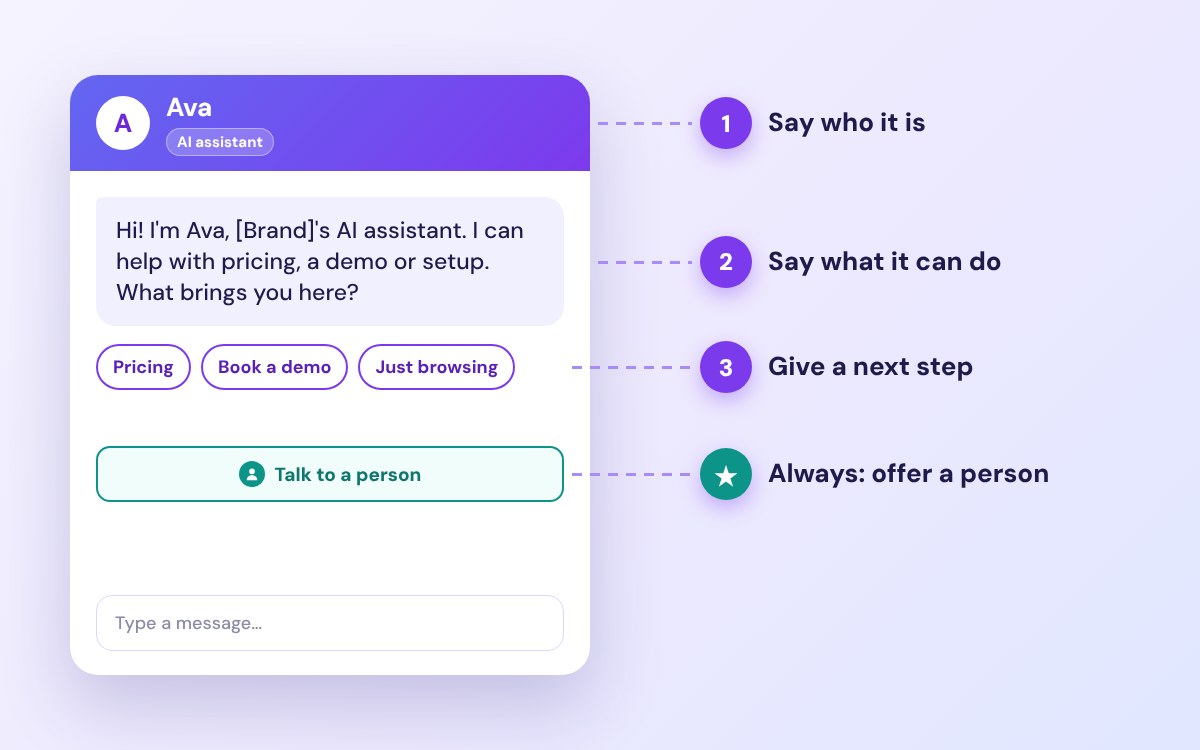
Keep the whole greeting short enough to read on a phone without scrolling. If you need more, send a second short bubble rather than one long block. Match the tone to your brand: warm and casual for shops, clear and calm for B2B, healthcare and finance.
9 situations at a glance
| Situation | When to show it | Example message |
|---|---|---|
| First-time visitor | After the visitor has settled on the homepage | "Hi! I'm Ava, [Brand]'s AI assistant. I can help with pricing, a demo or setup. What brings you here?" |
| Returning customer | When a known contact comes back | "Welcome back, [Name]! Want to pick up where we left off?" |
| Product browsing | When a shopper lingers on a category or product | "Want help finding the right fit, or should I show you our bestsellers?" |
| Cart and checkout | When a shopper pauses at the cart or checkout | "Any questions about your order? I can help with shipping, returns or payment." |
| Pricing page | Soon after the visitor opens your plans | "Comparing plans? Tell me your team size and I'll suggest one." |
| Demo or booking | On demo, contact and services pages | "Want a 15-minute demo? I can show you open times now." |
| Support | On help, docs and account pages | "I'm [Brand]'s AI assistant. Is this about billing, setup or something else?" |
| Lead magnet | On blog and resource pages | "Want our one-page checklist on [topic]? I can send it to your email." |
| Exit intent | When the visitor moves to leave a key page | "Before you go, can I answer one quick question?" |
27 chatbot welcome messages by situation
Each situation has three versions you can copy, the quick replies to add and one tip. Replace the brackets with your own details.
1. First-time visitor
| Example message | Best for |
|---|---|
| "Hi! I'm Ava, [Brand]'s AI assistant. I can help with pricing, a demo or setup. What brings you here?" | Homepage |
| "Welcome to [Brand]! I'm an AI assistant. Looking for something specific, or just exploring?" | General pages |
| "Hey! New here? I'm [Brand]'s AI helper and I can point you to the right page in two clicks." | Casual brands |
Quick replies: Pricing · Book a demo · Just browsing · Talk to a person
Tip: name only the tasks the bot can really do. If it cannot book demos, do not offer one.
2. Returning customer
| Example message | Best for |
|---|---|
| "Welcome back, [Name]! Want to pick up where we left off?" | Logged-in users |
| "Good to see you again! Anything new I can help with today?" | Returning visitors |
| "Hi [Name], your last order has shipped. Need help with anything else?" | After a purchase |
Quick replies: My account · Track an order · Talk to a person
Tip: use a name only when you are sure it is right. A wrong name is worse than none.
3. Product browsing
| Example message | Best for |
|---|---|
| "Want help finding the right fit, or should I show you our bestsellers?" | Category pages |
| "Questions about sizes, shipping or returns? Ask me anything." | Product pages |
| "Looking for a gift? Tell me who it's for and your budget." | Gift shops and seasonal sales |
Quick replies: Find my size · Shipping info · See bestsellers
Tip: two clear choices are easier to answer than an empty text box.
4. Cart and checkout
| Example message | Best for |
|---|---|
| "Any questions about your order? I can help with shipping, returns or payment." | Cart page |
| "Stuck at checkout? I can help you finish in a minute." | Checkout page |
| "Not sure about delivery times? Ask me before you buy." | High-value products |
Quick replies: Shipping cost · Returns policy · Payment options · Talk to a person
Tip: show it after a pause, not the moment the page loads, so it helps rather than interrupts.
5. Pricing page
| Example message | Best for |
|---|---|
| "Comparing plans? Tell me your team size and I'll suggest one." | SaaS pricing pages |
| "Not sure which plan fits? I can compare two plans side by side." | Several similar plans |
| "Need a quote for a bigger team? I can collect your details for sales." | Enterprise or custom pricing |
Quick replies: Compare plans · Book a demo · Talk to sales
Tip: visitors on a pricing page are close to a decision. Keep the tone helpful, not pushy.
6. Demo or booking
| Example message | Best for |
|---|---|
| "Want a 15-minute demo? I can show you open times now." | Demo pages |
| "Ready to book? I can show free slots this week." | Services and appointments |
| "Need an estimate? Answer three quick questions and I'll book a call." | Home services and agencies |
Quick replies: Book now · See times · Email me details
Tip: let people book inside the chat. Every extra page loses some of them.
7. Support
| Example message | Best for |
|---|---|
| "I'm [Brand]'s AI assistant. Is this about billing, setup or something else?" | Help centre |
| "Tell me the problem in a few words and I'll find the answer or a person who can help." | AI support bots |
| "Our team is offline until 9 a.m. I'm an AI assistant and can answer most questions now, or take a message." | After hours |
Quick replies: Billing · Technical help · Leave a message · Talk to a person
Tip: never trap people in the bot. A clear way to a person keeps trust. See how many after-hours chats you could answer with the after-hours lead calculator.
8. Lead magnet
| Example message | Best for |
|---|---|
| "Want our one-page checklist on [topic]? I can send it to your email." | Blog readers |
| "New here? Get 10% off your first order." | Online shops |
| "Want a price sheet for your team size? I can send it now." | B2B services |
Quick replies: Yes, send it · Maybe later · Ask a question
Tip: make the offer specific. "A checklist of 10 onboarding mistakes" gets more interest than "a free guide".
9. Exit intent
| Example message | Best for |
|---|---|
| "Before you go, can I answer one quick question?" | Any key page |
| "Leaving already? I can email you a summary of this page." | Long content pages |
| "Wait! Your 10% code is still waiting. Want it before you leave?" | Online shops |
Quick replies: One question · Email me this · No thanks
Tip: use exit intent only on a few high-value pages, and show it once per visit.
Welcome messages by industry
The same formula works in every industry; the tasks and tone change. Here is a starting line for each, with a link to our free template pack for that industry.
| Industry | Example message | Template |
|---|---|---|
| SaaS | "Hi! I'm [Brand]'s AI assistant. Want a quick tour, or help choosing a plan?" | SaaS templates |
| Ecommerce | "Hey! Need help with sizes, shipping or today's deals?" | Ecommerce templates |
| Dental clinic | "Hello! I'm the clinic's AI assistant. I can book, move or cancel an appointment." | Dental templates |
| Real estate | "Hi! Want to see homes in your budget, or book a viewing?" | Real estate templates |
| Law firm | "Hello. I'm an AI assistant and can't give legal advice, but I can book a free consultation." | Law firm templates |
| Mortgage broker | "Hi! Want to check what you could borrow, or talk to a broker?" | Mortgage templates |
Find more ready-made greetings in our chatbot welcome message templates.
Should a chatbot say it is a bot? The 2026 rules
Yes, and in the EU it is now required. Two rules matter for most websites:
- EU AI Act, Article 50(1). Since 2 August 2026, AI systems that talk directly with people must be designed so that people are told they are interacting with an AI system, unless it is obvious. The European Commission says people must be told from the start of the first interaction, in a clear and distinguishable way that meets accessibility requirements.
- California, Business and Professions Code § 17941. It is unlawful to use a bot to talk with people in California online with the intent to mislead them about its artificial identity in order to drive a sale or influence a vote. A business is not liable if it discloses that it is a bot in a clear and conspicuous way.
The simplest way to comply is to say it in the first line: "I'm [Brand]'s AI assistant." A label such as "AI assistant" next to the bot's name also helps. If you are unsure how these rules apply to you, ask a lawyer.
When to show the welcome message
- Most pages: wait until the visitor has settled, for example 15–30 seconds or a scroll down the page.
- High-intent pages (pricing, checkout, contact, booking): show it sooner, because these visitors often have a question.
- Exit intent: use it sparingly, on a few key pages, once per visit.
- Returning visitors: do not repeat a greeting they have already seen; change it or stay quiet.
- Mobile: keep it to one short bubble so it does not cover the page.
5 mistakes to avoid
| Do this | Not this |
|---|---|
| "I can help with pricing or a demo. Which one?" | "Hello. How may I assist you today?" |
| Say it is an AI assistant in the first line | Let the bot pretend to be a person |
| 3–4 quick replies, including "Talk to a person" | An empty text box only |
| One or two short sentences | A paragraph that fills the phone screen |
| A short delay or a page-based trigger | A pop-up the instant the page loads |
How to test and improve your greeting
- Write two versions for one busy page, for example a feature-led and a question-led greeting.
- Split traffic between them for at least a few weeks, or until each has enough chats to compare.
- Compare how many visitors reply or click a quick reply, and how many chats become leads or bookings.
- Keep the winner and test the next idea. Our free A/B test calculator tells you when the difference is real.
Set it up in CRMsoftware.pro
In CRMsoftware.pro you write the first message for each bot, add custom instructions and suggested replies, and the AI answers from your own website and documents. From the Launch plan, chats can be handed over to a person, and the conversation and contact land in the CRM pipeline. The free plan includes 3 users and 100 AI messages a month.
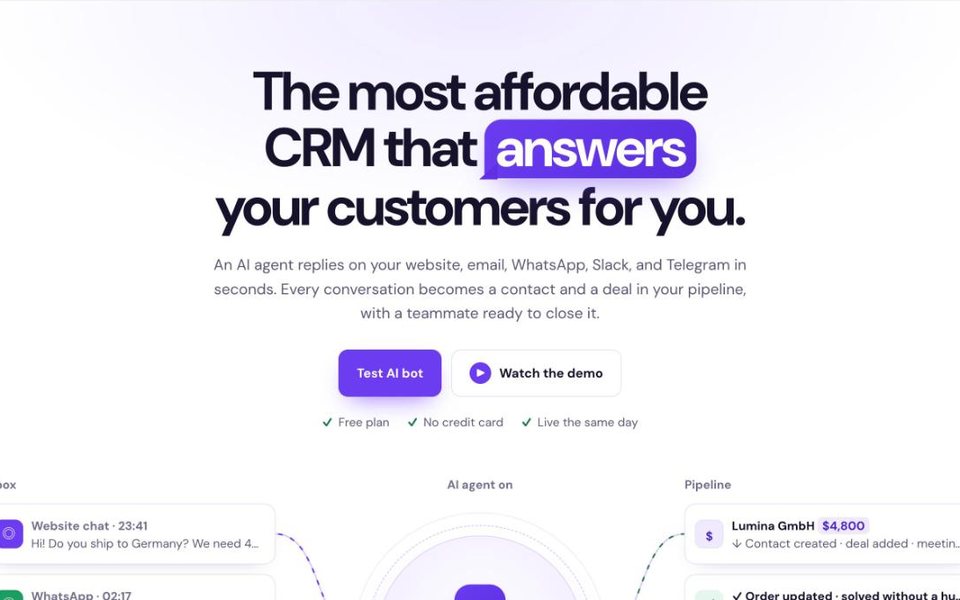
Paste your website, write a first message from this guide and test it on your own site. Start free, no card needed, or see pricing.
FAQ
What is a good chatbot welcome message?
One or two short sentences that say who is talking (and that it is an AI assistant), what it can help with and what to do next, with 3–4 quick-reply buttons and a way to reach a person. Example: "Hi! I'm Ava, [Brand]'s AI assistant. I can help with pricing, a demo or setup. What brings you here?"
How long should a chatbot greeting be?
Short enough to read on a phone without scrolling: usually one or two sentences. If you need to say more, send a second short message rather than one long block.
Does a chatbot have to say it is a bot?
In the EU, yes: since 2 August 2026, Article 50 of the AI Act requires that people be told they are talking to an AI system from the start, unless it is obvious. In California, using a bot to mislead people about its identity to drive a sale is unlawful unless you disclose it is a bot. Saying "I'm an AI assistant" in the first line covers both.
When should the welcome message appear?
On most pages, after the visitor has settled, for example 15–30 seconds or a scroll. On pricing, checkout and contact pages, sooner. Use exit-intent messages only on a few key pages.
Should I use the visitor's name?
Only when you know it for sure, for example for logged-in users or known contacts. A wrong or made-up name feels worse than a neutral greeting.
Should a welcome message use emojis?
One emoji can suit a consumer brand. Skip them for B2B, healthcare, legal and finance, where a calm, clear tone builds more trust.
How many quick replies should I add?
Three or four. Cover the most common reasons people chat, and always include "Talk to a person".
Sources
- European Commission: Transparency obligations under Article 50 of the AI Act, last updated 24 July 2026, checked Oct 7, 2026.
- California Business and Professions Code § 17941 (FindLaw, current as of January 1, 2026), checked Oct 7, 2026.
- CRMsoftware.pro features and pricing, checked Oct 7, 2026.
Put a welcome message to work
An AI assistant that greets visitors, answers from your content, hands chats to your team and saves every lead in a CRM. Free for 3 users; Launch is $19/month billed yearly for 8 users.
Start free See pricing

