


HelpCrunch costs $12 per team member a month on Basic and $20 on Pro, billed yearly. That is cheap per seat, but Basic has no AI agent, chatbot or WhatsApp, and Pro includes only 50 AI conversations a month. Extra AI is sold in extensions, from $23.20 per 100 conversations on yearly billing.
For AI chat, a team inbox and a CRM with users and AI messages included, try CRMsoftware.pro (from $19 a month). For a flat price per workspace, Crisp. For the strongest AI agent, Intercom (Fin). For chat plus ticketing, Freshdesk Omni.
For online stores, Tidio. For a cheap help desk with no AI fees (call center from the $29 Team plan), LiveAgent. For an email-first inbox, Help Scout. For enterprise scale, Zendesk. For open source, Chatwoot.
We checked every price on the vendor's own pricing page on October 27, 2026, in US dollars, before tax. We show the yearly price first and the monthly price in brackets where the vendor lists both.
CRMsoftware.pro is our own product, so we list its limits too. No made-up scores or tests: each tool gets its real price, its pros and cons, and who it suits.
What HelpCrunch costs in 2026
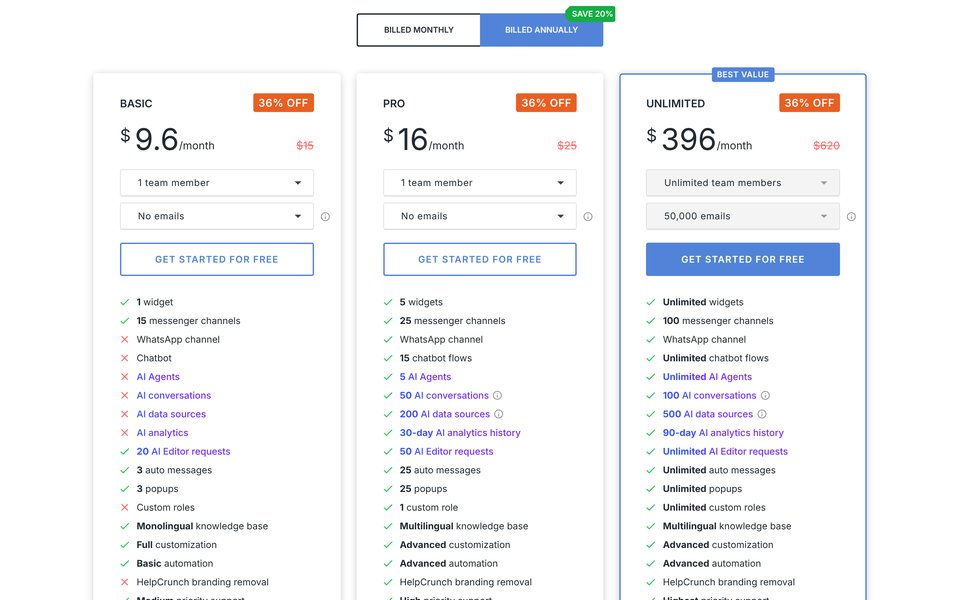
HelpCrunch is a customer messaging platform. It bundles live chat, messenger channels, a chatbot, AI agents, a knowledge base, auto messages, popups and email marketing. You pay per team member, plus add-ons for emails and AI.
The plans on October 27, 2026:
| Plan | Price | What you get | What is missing |
|---|---|---|---|
| Basic | $12 per team member/mo billed yearly ($15 monthly) | 1 widget, 15 messenger channels, 3 auto messages, 3 popups, 20 AI Editor requests, single-language knowledge base | No WhatsApp, chatbot, AI agents or custom roles; HelpCrunch branding stays |
| Pro | $20 per team member/mo billed yearly ($25 monthly) | 5 widgets, 25 channels, WhatsApp, 15 chatbot flows, 5 AI agents, 50 AI conversations a month, 200 AI data sources, 25 auto messages and popups, multilingual knowledge base, no branding | More AI conversations cost extra; 1 custom role |
| Unlimited | $495/mo billed yearly ($620 monthly) | Unlimited team members, widgets, chatbot flows and AI agents, 100 channels, 50,000 emails, 100 AI conversations a month, 500 data sources | Still only 100 AI conversations before extensions |
A promo is on the page right now. On October 27 the page showed "Up to 36% off your first payment", and its signup links carry the code HAUNT20 (20% off the first payment). That takes Pro to $16 per member for the first yearly payment. The prices above are the regular ones you pay after that.
AI conversations are sold as monthly extensions on top of the free limit. On yearly billing, 100 extra cost $23.20 a month, 200 cost $44.80, 500 cost $100 and 1,000 cost $160. On monthly billing the same packs cost $29, $56, $125 and $200.
When the AI limit runs out, the bot does not charge you. HelpCrunch's docs say the AI agent step is skipped in chatbot flows until the next billing cycle or until you buy an extension. Limits reset each billing cycle.
Other costs. Emails are an add-on on Basic and Pro, and the count includes manual email replies from the inbox. 5,000 emails add $20 a month to Pro ($16 on yearly billing). AI data sources are extended from $4 per 100 on yearly billing; one help article in 3 languages counts as 3 sources.
There is a free trial with no card and free migration into HelpCrunch, but no free plan.
What HelpCrunch costs a 3-person team
Three team members, list prices, before tax. The AI rows assume the bot handles about 250 or 550 conversations a month.
| Setup | Billed monthly | Billed yearly (per month) |
|---|---|---|
| Basic, no AI agent | 3 × $15 = $45 | 3 × $12 = $36 |
| Pro, 50 AI conversations included | 3 × $25 = $75 | 3 × $20 = $60 |
| Pro + 200 AI conversations (250 in total) | $75 + $56 = $131 | $60 + $44.80 = $104.80 |
| Pro + 500 AI conversations (550 in total) | $75 + $125 = $200 | $60 + $100 = $160 |
| Same, plus 5,000 emails a month | $200 + $20 = $220 | $160 + $16 = $176 |
| Unlimited, any team size, 100 AI conversations, 50,000 emails | $620 | $495 |
Seats are the small part of the bill once the AI is busy. Pro stops at 20 team members on the pricing page ($400 a month billed yearly for 20). Larger teams have to move to Unlimited at $495.
Why teams look for a HelpCrunch alternative
- The cheap plan has no bot. At $12 you get chat, popups and auto messages, but no chatbot, no AI agent, no WhatsApp and the HelpCrunch badge on your widget. AI agents start at $20 per member.
- AI conversations are capped low. Pro includes 50 a month and Unlimited 100. A team whose bot handles 550 chats pays $100 a month more on yearly billing, on top of the seats.
- Per-member pricing. Five people on Pro cost $100 a month before emails and AI. The flat Unlimited plan is $495.
- No call center, SLA rules or sales pipeline are listed on the pricing page. Teams that need phone support, SLAs or deals need a second tool.
- Paid AI extras. One Capterra reviewer (October 2024) listed as a con: "That we need to pay extra for AI Editor." Today AI Editor requests are included with limits; the paid extras are AI conversations and data sources.
To be fair, users rate HelpCrunch highly: 4.8 out of 5 from 195 reviews on Capterra, with 4.7 for value for money and 4.8 for customer service. Another reviewer wrote: "HelpCrunch offers more features than other similar platforms at a fraction of the cost."
HelpCrunch alternatives at a glance
| Tool | Best for | Entry price (checked Oct 27, 2026) | How AI is billed | Free plan |
|---|---|---|---|---|
| HelpCrunch (for reference) | Chat + popups + email marketing | $12 per member/mo (no AI agent); $20 with AI | 50 AI conversations on Pro, then extensions from $23.20 per 100 | No, free trial |
| CRMsoftware.pro | AI chat + inbox + CRM, users included | $19/mo for 8 users | AI messages included (1,000 a month on Launch) | Yes, 3 users, website chat only |
| Crisp | Flat price per workspace | $45/mo per workspace, 4 seats (monthly price) | Credits: $5 included on Mini, $25 on Essentials | Yes, 2 seats, no AI |
| Intercom (Fin) | Strongest AI agent, pays per result | $19/seat/mo for new customers ($29 list) | $0.99 per Fin outcome (a resolution or a procedure handoff); nothing when Fin can't answer | No, 14-day trial |
| Freshdesk Omni | Chat plus a ticketing help desk | $29/agent/mo | 500 AI sessions once, then $49 per 100 | No, 14-day trial |
| Tidio | Online stores | $24.17/mo for 100 conversations | Lyro from $32.50/mo for 50 AI conversations | Yes, 50 conversations a month |
| LiveAgent | Cheap help desk, call center, no AI fees | $15/agent/mo (up to 5 agents); call center from $29 | No AI fee: you pay your own AI provider | No, 30-day trial |
| Help Scout | Email-first shared inbox | $25/user/mo | Envoy AI $0.75 per resolution | Yes, 5 users, 100 contacts a month |
| Zendesk | Enterprise help desk | $55/agent/mo (Suite Team) | Per verified resolution beyond the plan allowance; price not published | No, 14-day trial |
| Chatwoot | Open source and self-hosting | $19/agent/mo (cloud) | Captain credits included; extra $20 per 1,000 | Yes, 2 agents; or self-host |
What a 3-person team pays per month
Our example: 3 team members and 500 chats a month. The AI answers every chat first and fully resolves about 250. The team handles the other 250.
All rows use list prices billed yearly, before tax, unless we say otherwise. AI add-ons use the prices on each vendor's own page.
| Tool and plan | How the bill adds up | Monthly total |
|---|---|---|
| LiveAgent Starter | 3 × $15 = $45. AI runs on your own OpenAI, Anthropic, Gemini or FlowHunt account, billed by that provider | $45 + your AI provider's bill |
| CRMsoftware.pro Growth | $49 flat for 20 users and 3,000 AI messages, enough for 500 chats at about 3 AI replies each. Launch at $19 covers about 330 chats | $49 |
| Chatwoot Startups (cloud) | 3 × $19 = $57 with 300 Captain credits. Each AI reply uses 1 credit, so 500 chats at about 3 replies each (1,500 credits) add 1,200 credits × $20 per 1,000 = $24 | About $81 |
| Crisp Essentials | $95 flat (10 seats) with $25 of AI credits. 500 AI conversations at about $0.05–$0.10 each = $25–$50. Crisp shows monthly prices | About $95–$120 |
| HelpCrunch Pro | 3 × $20 = $60 + 500-conversation extension $100 (50 are included). Add $16 if you send 5,000 emails | $160 |
| Zendesk Suite Team | 3 × $55 = $165 + verified AI resolutions beyond the plan allowance. Zendesk doesn't publish that price | $165 + AI resolutions |
| Help Scout Standard | 3 × $25 = $75 + 250 Envoy resolutions × $0.75 = $187.50. The first 3 months of AI are free | $262.50 |
| Intercom Essential | 3 × $19 (new-customer price) = $57 + 250 Fin outcomes × $0.99 = $247.50. At the $29 list price, $334.50 | $304.50 |
| Freshdesk Omni Growth | 3 × $29 = $87 + 5 packs of 100 AI sessions × $49 = $245. The 500 free sessions are a one-time offer, so they cover only the first month. We assume packs are bought monthly; Freshworks ties a pack's validity to your billing cycle, so check before you plan yearly | $332 |
| Tidio Growth + Lyro | $49.17 for 250 team-answered conversations + $291.67 for 500 Lyro conversations, from Tidio's calculator | $340.83 |
HelpCrunch sits in the middle: cheap seats, expensive AI. Tools with an AI allowance in the plan (CRMsoftware.pro, Crisp, Chatwoot) stay under $120 here. Per-result billing (Help Scout, Intercom) and per-session or per-conversation billing (Freshdesk, Tidio) cost $262–$341 here, two to three times the tools with an AI allowance.
LiveAgent looks cheapest, but you still pay OpenAI or another provider for every AI reply. Your numbers will differ, so try our AI chatbot pricing calculator and the live chat staffing calculator.
The 9 best HelpCrunch alternatives
1. CRMsoftware.pro: best for AI chat plus a CRM at one team price
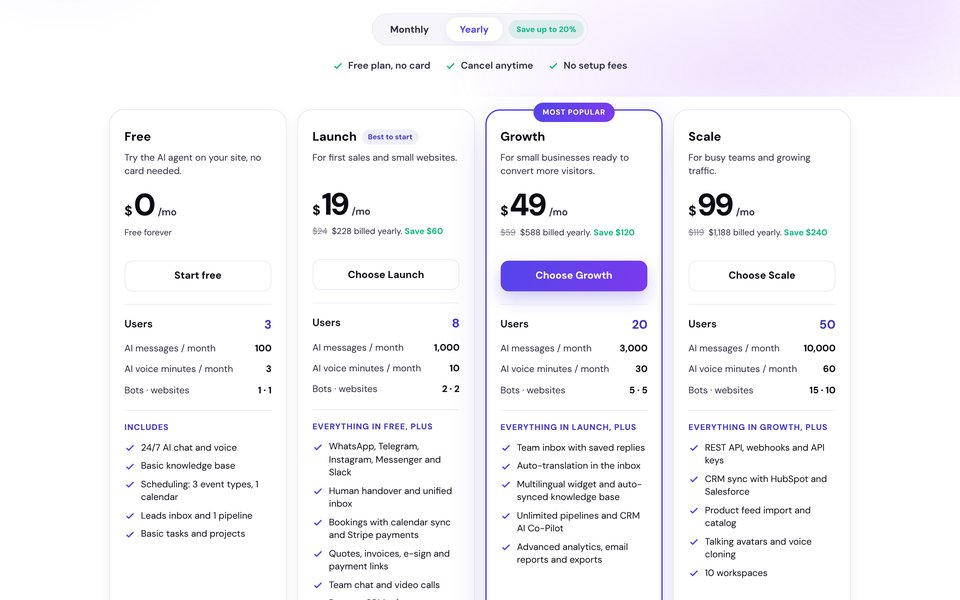
CRMsoftware.pro is our product, so judge this section with that in mind. Like HelpCrunch it starts from the website chat widget, but the AI is in every plan, including the free one, and the price covers the whole team.
The AI agent answers on your website, WhatsApp, Instagram, Messenger, Telegram and Slack, and hands over to a person from Launch. Every chat becomes a contact you can turn into a deal in the built-in pipeline. AI voice calls and bookings are included.
Price (Oct 27, 2026): Free for 3 users and 100 AI messages a month (website chat only, no handover). Launch $19/mo billed yearly ($24 monthly) for 8 users, 1,000 AI messages, messengers, human handover, the unified inbox and no branding.
Growth $49 ($59) for 20 users, 3,000 AI messages, the team inbox with saved replies and a multilingual widget. Scale $99 ($119) for 50 users, 10,000 AI messages and the REST API. Only AI replies count as AI messages; your team's replies don't.
Pros: flat price for the whole team; AI messages included on every plan; CRM pipeline, bookings and payment links built in; AI voice; no badge from Launch.
Cons: no popups or proactive auto messages listed; no public help center or ticketing with SLAs; the features page lists email and marketing modules, but the pricing page doesn't say which plan includes them; far fewer integrations than Zendesk or Intercom.
Best for: small sales and support teams that want AI chat and a CRM on one bill.
Count last month's AI conversations in HelpCrunch's billing settings, then compare with a plan where AI messages are included. Start free, no card needed, or see pricing.
2. Crisp: best flat price per workspace
Crisp is the closest match to HelpCrunch: a chat-first inbox with a knowledge base, a chatbot and the Hugo AI agent, priced per workspace with seats included. Hugo runs on credits, not a monthly conversation cap. See our Crisp alternatives guide too.
Price (Oct 27, 2026, monthly): Free for 2 seats, no AI. Mini $45/mo per workspace for 4 seats with $5 of AI credits. Essentials $95 for 10 seats with $25 of credits, the omnichannel inbox, AI chatbot, workflows and a knowledge base.
Plus $295 for 20+ seats with $75 of credits, ticketing and white labelling. On Plus, extra seats cost $10 each. Crisp's help center puts a full Hugo conversation at about $0.05–$0.10. Yearly billing can be turned on in the app, but the page shows no yearly price.
Pros: flat price; AI conversations cost cents; mobile apps; 14-day trial of every plan.
Cons: the omnichannel inbox and knowledge base start at $95; Hugo stops when credits run out unless you turn on pay-as-you-go; Plus is a big jump.
Best for: startups that want HelpCrunch's feature set without per-member pricing.
3. Intercom (Fin): best AI agent that bills per result
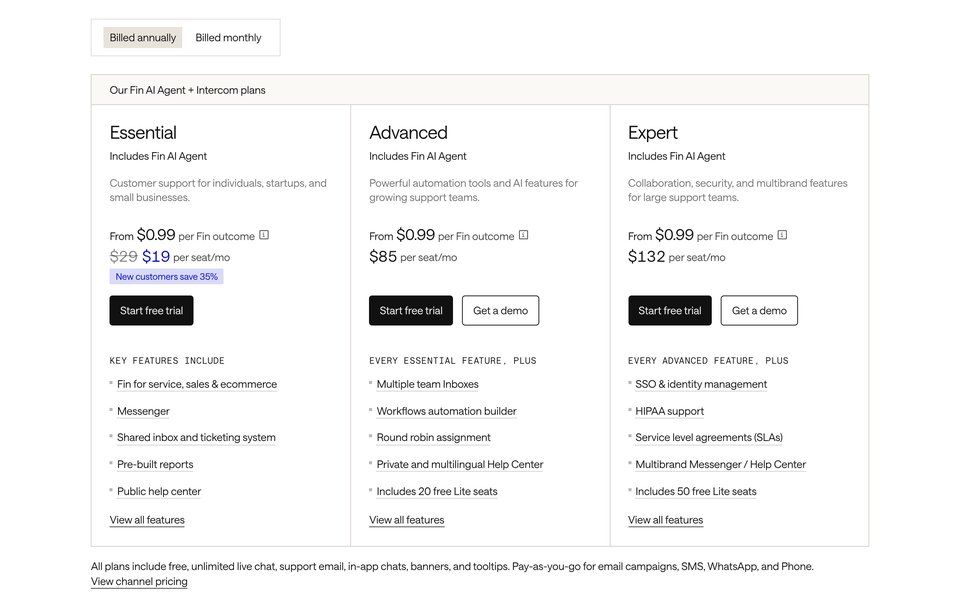
Intercom is the helpdesk with the Fin AI Agent built in. The company now goes by Fin, and Salesforce completed its acquisition of Fin on September 10, 2026. More options in our Intercom alternatives guide.
You pay $0.99 per Fin outcome, at most one per conversation, and nothing when Fin can't answer or the customer asks for a human.
Price (Oct 27, 2026, billed yearly): Essential $29/seat/mo ($39 monthly), shown at $19 ($29) for new customers. Advanced $85 ($99), Expert $132 ($139). Fin $0.99 per outcome on every plan, Fin Voice $1.99 per voice outcome. Copilot $29 per teammate. 14-day trial without a card.
Live chat, support email and in-app chats are included. Email campaigns, SMS and WhatsApp are pay-as-you-go.
Pros: top-tier AI with per-result billing; help center, tickets and messenger in one; spending limits on Fin; mature integrations.
Cons: no free plan; Advanced and Expert seats are expensive; bulk emails are billed per send; HelpCrunch sells email volume as a monthly add-on (Unlimited includes 50,000); a busy AI means a large bill.
Best for: SaaS teams that want the best AI and in-app messaging and can pay per solved chat.
4. Freshdesk Omni: best chat plus ticketing help desk
Freshdesk Omni bundles the Freshdesk ticketing help desk with Freshchat messaging in one seat price. If HelpCrunch's missing tickets are the problem, this is the budget route into a real help desk.
Price (Oct 27, 2026): Growth $29/agent/mo billed yearly ($35 monthly), Pro $79 ($95), Enterprise $119 ($143). Extra Freddy AI Agent sessions cost $49 per 100. Freddy AI Copilot is $29 per agent from Pro. 14-day trial of the Enterprise plan.
Read the AI terms. A session is everything the bot says to one visitor in a 24-hour window. New customers get 500 sessions once. Freshworks' FAQ says these are removed when you buy your first paid pack. When sessions run out, chats go to your agents.
Pros: tickets, chat, social and email in one; a customer portal and knowledge base; big integration marketplace.
Cons: sessions are billed even when the bot hands over; the 500 free sessions are not monthly; multilingual support and smart routing need Pro.
Best for: support teams that have outgrown a chat inbox and need tickets and a customer portal.
5. Tidio: best for online stores
Tidio pairs a live chat and ticketing inbox with Lyro, an AI agent built for ecommerce questions, plus Flows automations. It bills by conversations your team answers, not by seats, which suits small shops with many chats and few agents.
Price (Oct 27, 2026, billed yearly): Free for 50 billable conversations a month and 10 seats. Starter $24.17/mo ($29 monthly) for 100. Growth from $49.17 ($59) for 250. Plus from $300 plus usage.
Lyro starts at $32.50 for 50 AI conversations; Tidio's calculator shows $291.67 for 500. AI and Flows replies don't count as billable conversations. Branding removal is a $16.67 add-on. 7-day free trial.
Pros: strong ecommerce AI; seats aren't the price driver; free plan to start.
Cons: Lyro gets expensive at volume; the badge costs extra; self-serve plans cap at 10 seats.
Best for: small and mid-size online stores.
6. LiveAgent: best cheap help desk with no AI fees
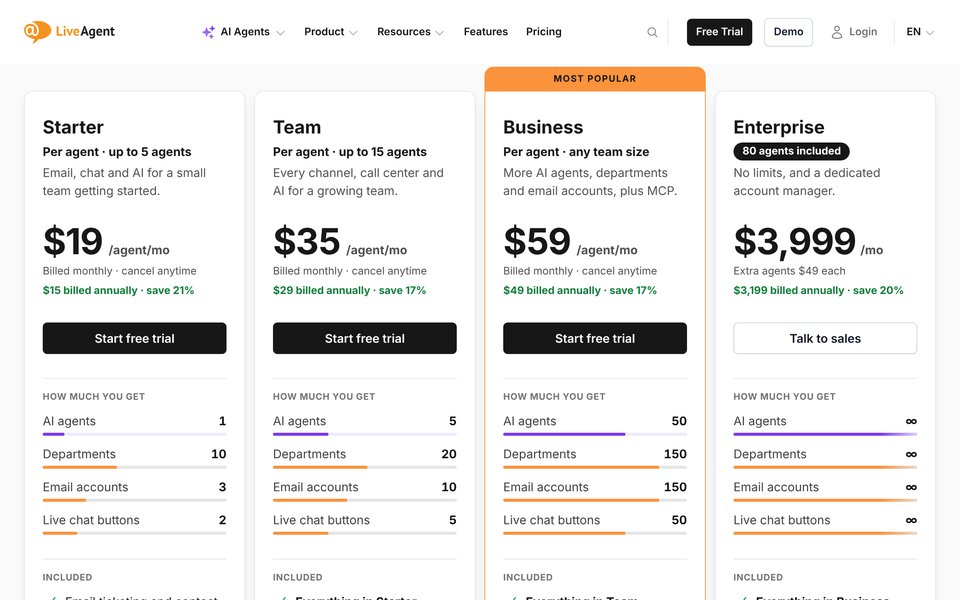
LiveAgent is a ticketing help desk with live chat, a knowledge base and a call center. LiveAgent's AI model is different: it charges nothing for AI. You connect your own OpenAI, Anthropic, Google Gemini or FlowHunt account and pay that provider for usage.
Price (Oct 27, 2026): Starter $15/agent/mo billed yearly ($19 monthly) for up to 5 agents, with email, chat, chatbot, knowledge base and 1 AI agent. Team $29 ($35) for up to 15 agents adds WhatsApp, Instagram, Facebook, Telegram, the call center, reports and SLA rules.
Business $49 ($59) has no team-size cap, 50 AI agents and branding removal. Enterprise is $3,199 a month billed yearly ($3,999) with 80 agents included. 30-day trial, no card, no free plan.
Pros: cheapest paid help desk here; no per-resolution or token markup; call center from Team; free migration from help desks with a built-in plugin.
Cons: you need and manage your own AI provider account; social channels start on Team; branding removal only from Business.
Best for: small teams that answer by phone and email as much as by chat.
7. Help Scout: best email-first shared inbox
Help Scout is a shared inbox for email, live chat, SMS, WhatsApp, Instagram and Messenger, with Docs knowledge bases and a small free plan. Its AI agent, Envoy, is billed per resolution, like Intercom's Fin but cheaper. See our Help Scout alternatives guide.
Price (Oct 27, 2026, billed yearly): Free for up to 5 users, 1 inbox, 1 Docs site and 100 contacts a month. Standard $25/user/mo ($30 monthly), up to 25 users. Plus $45 ($54), up to 50 users. Pro $75 ($90), minimum 10 users.
Envoy costs $0.75 per resolution, with 3 months of free resolutions for new accounts and a monthly spending cap. Extra inboxes cost $10, extra Docs sites $20. 15-day trial.
Pros: clean inbox; free plan for small teams; AI billed only for resolved conversations; strong help center.
Cons: per-user pricing; the free plan caps contacts at 100 a month; fewer chatbot and popup tools than HelpCrunch.
Best for: support teams that live in email and want chat as a second channel.
8. Zendesk: best enterprise help desk
Zendesk is the enterprise answer: email, tickets, messaging, live chat, phone, a knowledge base and AI agents in one suite, with a large app marketplace. Live chat starts on Suite Team; the cheaper Support Team plan is email and tickets only.
Price (Oct 27, 2026, billed yearly): Support Team $19/agent/mo (no chat). Suite Team $55 with AI agents, messaging, live chat and phone. Suite Professional $115 with skills-based routing and Admin Copilot. Copilot for agents $50. 14-day trial of Suite Professional.
AI billing changed in May 2026. Zendesk now sorts AI conversations into tiers. Only verified resolutions draw from your plan's allowance; escalations and unverified ones don't. The public pages don't list a price per resolution, so ask sales before you plan a busy AI.
Pros: every channel and real ticketing; AI billed only for verified resolutions; deep reporting and SLAs.
Cons: the cheapest plan with chat is $55 per agent; AI resolution prices aren't public; setup takes real work.
Best for: mid-size and larger teams that need a help desk, not a chat tool.
9. Chatwoot: best open-source option
Chatwoot is an open-source omnichannel inbox you can self-host for free or use as a cloud service. Channels include website chat, email, WhatsApp, Instagram, Telegram and SMS. The Captain AI agent runs on credits included in each paid plan.
Price (Oct 27, 2026, cloud): Hacker free for 2 agents and 500 conversations a month, live chat only. Startups $19/agent/mo with all channels and 300 Captain credits. Business $39 with 500 credits and 2-year data retention. Enterprise $99 with 800 credits and 3-year retention.
Extra credits cost $20 per 1,000. 15-day trial. The self-hosted Community Edition is free (you pay for servers), but Captain AI on self-hosted needs Premium Support ($19/agent/mo) or Enterprise Edition ($99), plus your own OpenAI key.
Pros: own your data; cheap AI top-ups ($20 per 1,000 replies); active open-source project.
Cons: self-hosting needs an engineer; the free cloud plan is live chat only with 30-day retention; no email marketing.
Best for: teams with technical staff or strict data-residency rules.
Free HelpCrunch alternatives
HelpCrunch has no free plan. If you need one, these are the limits that matter on October 27, 2026:
| Tool | Free plan | Catch |
|---|---|---|
| CRMsoftware.pro | 3 users, 100 AI messages a month, website chat | AI only: no human handover or unified inbox until Launch ($19) |
| Crisp | 2 seats, website chat, shared inbox, mobile apps | No AI credits |
| Help Scout | 5 users, 1 inbox, 1 Docs site | 100 contacts a month |
| Tidio | 50 conversations a month, 10 seats | Lyro is 50 conversations once, not monthly |
| Chatwoot | 2 agents, 500 conversations (cloud), or self-host | Cloud free plan is live chat only with 30-day retention; free self-hosted edition has no Captain AI |
| Freshchat (not Omni) | Up to 10 agents, web and mobile chat, shared inbox, email | No AI agent; social channels start on Growth |
When to stay on HelpCrunch
- You use the whole bundle. Chat, popups, auto messages, knowledge base and email campaigns from one admin is HelpCrunch's real strength. Replacing it can mean two or three tools.
- Low AI volume. If the bot handles under 50 chats a month, Pro at $20 per member is fair value, and the AI simply stops at the cap instead of billing you.
- A big team on Unlimited. Above 20 members, Pro is no longer offered, and $495 for unlimited seats beats most per-seat tools, as long as 100 AI conversations a month is enough.
How to choose
| If you… | Choose |
|---|---|
| want AI chat, an inbox and a CRM at one team price | CRMsoftware.pro |
| want HelpCrunch's features at a flat workspace price | Crisp |
| want the AI to resolve as many chats as possible | Intercom (Fin) |
| need tickets and a customer portal on a budget | Freshdesk Omni |
| run an online store | Tidio |
| answer by phone too, or want to use your own AI account | LiveAgent |
| answer mostly email | Help Scout |
| need an enterprise help desk with every channel | Zendesk |
| want to self-host or own your data | Chatwoot |
Before you pick, count last month's AI conversations and emails in HelpCrunch. Those two numbers decide the bill on most tools, more than seats do.
How to switch from HelpCrunch
- Check your billing date. If you pay yearly, plan the move around renewal, and cancel AI and email extensions you no longer need.
- Export your contacts. HelpCrunch exports all or filtered contacts as CSV or XLSX. The file goes to your registration email, so confirm that address first.
- Save chat history and help articles. Copy your knowledge base articles, saved replies and popup texts. For full chat history, use HelpCrunch's REST API or ask its support.
- Train the new AI. Import help articles before you turn the bot on. Our FAQ knowledge base starter helps fill gaps.
- Set handover rules. Decide when the AI passes to a person and who gets the chat; our human handover playbook has the rules we use.
- Move email lists and WhatsApp. Export subscribers with their consent status for your email tool. Ask the new vendor to move your WhatsApp Business number so it isn't left unconnected.
- Swap the widget. Replace the HelpCrunch snippet on your site and apps, then compare the first full month with the table above before you cancel.
FAQ
What is the best HelpCrunch alternative?
For AI chat, a team inbox and a CRM with users and AI messages included, CRMsoftware.pro from $19 a month. For the closest feature match at a flat price, Crisp. For the strongest AI agent, Intercom (Fin).
For tickets and a customer portal, Freshdesk Omni. For a free plan, Help Scout or Chatwoot.
How much does HelpCrunch cost in 2026?
On October 27, 2026: Basic $12 per team member a month billed yearly ($15 monthly), Pro $20 ($25) and Unlimited $495 ($620) for unlimited members. A first-payment promo (code HAUNT20) takes 20% off the first payment. The page advertises it as up to 36% off because it counts the yearly discount too.
Extra AI conversations cost from $23.20 per 100 a month on yearly billing ($29 monthly).
How much does HelpCrunch cost for 3 people?
Pro for 3 members is $60 a month billed yearly ($75 monthly) with 50 AI conversations. With 500 extra AI conversations it is $160 ($200 monthly). Basic for 3 is $36 ($45) but has no AI agent.
Does HelpCrunch have a free plan?
No. HelpCrunch offers a free trial with no card and free migration, but every plan is paid. Free alternatives include Help Scout (5 users), Crisp (2 seats), Chatwoot (2 agents or self-hosted), Freshchat (10 agents) and CRMsoftware.pro (3 users).
What happens when HelpCrunch AI conversations run out?
The AI agent step is skipped in chatbot flows and the chat moves to the next step, usually your team. HelpCrunch doesn't charge extra automatically; you buy an extension or wait for the next billing cycle.
Which HelpCrunch alternative includes email marketing?
Intercom sends email campaigns, billed per bulk email. CRMsoftware.pro lists an email and a marketing module on its features page, but not on the pricing page. Crisp also sends email campaigns (Crisp Campaigns). Chatwoot, LiveAgent and Help Scout focus on support email and expect a separate newsletter tool.
Which alternative has the cheapest paid seats?
LiveAgent Starter at $15 per agent a month billed yearly, then Chatwoot Startups and Intercom Essential (new customers) at $19 per seat. CRMsoftware.pro and Crisp charge per team: $19 for 8 users and $45 for 4 seats.
Is HelpCrunch or Crisp cheaper?
For 3 people with light AI use, HelpCrunch Pro is $60 a month billed yearly ($75 monthly) and Crisp Mini is $45 a month (monthly price). Once the AI handles hundreds of chats, Crisp is cheaper: about $0.05–$0.10 per AI conversation, against $100 a month for 500 extra on HelpCrunch.
Sources
- HelpCrunch pricing, checked Oct 27, 2026: monthly and annual toggle, team-member and email selectors, AI conversation and data source extension tables.
- HelpCrunch docs: AI Agents pricing and limits and How to export your contacts, checked Oct 27, 2026.
- HelpCrunch reviews: Capterra, checked Oct 27, 2026.
- Pricing pages checked Oct 27, 2026: CRMsoftware.pro, Crisp, Intercom, Freshdesk Omni, Freshchat, Tidio, LiveAgent, Help Scout, Zendesk, Chatwoot and Chatwoot self-hosted. Also Crisp Campaigns.
- AI billing details: Crisp: Hugo AI pricing and billing; Freshworks: Freddy AI Agent sessions FAQs (modified Aug 12, 2026); Chatwoot: How AI credits work in Captain; Zendesk: About automated resolution tiers (edited Sep 30, 2026).
- Salesforce completes acquisition of Fin, Sep 10, 2026.
AI chat without a 50-conversation cap
AI answers, a team inbox and a CRM pipeline with users and AI messages included. Free for 3 users; Launch is $19/month billed yearly for 8 users and 1,000 AI messages, Growth $49 for 20 users and 3,000.
Start free See pricing

