


HubSpot Service Hub is cheap to start ($7 per seat on Starter) but the help desk most teams need is Professional: $90 per seat billed yearly, a required $1,500 onboarding fee, and its Customer Agent bills $0.50 per resolved conversation once the 3,000 included credits run out. Starter has no AI agent and no knowledge base. For AI chat, a team inbox and a CRM at one team price from $19 a month, try CRMsoftware.pro. For a full help desk at scale, Zendesk. For cheap ticketing, Freshdesk. For the lowest seat price, Zoho Desk. For a calm email-first inbox, Help Scout. For an AI-first help desk, Intercom (Fin). For teamwork on shared email, Front. For support inside Gmail, Hiver. For an enterprise CRM-based help desk, Salesforce Service Cloud.
We checked every price on the vendor's own pricing page on October 17, 2026, in US dollars, billed yearly unless we say otherwise, before tax. CRMsoftware.pro is our own product, so we list its limits too. No made-up scores or tests: each tool gets its real price, its pros and cons, and who it suits.
What HubSpot Service Hub costs in 2026
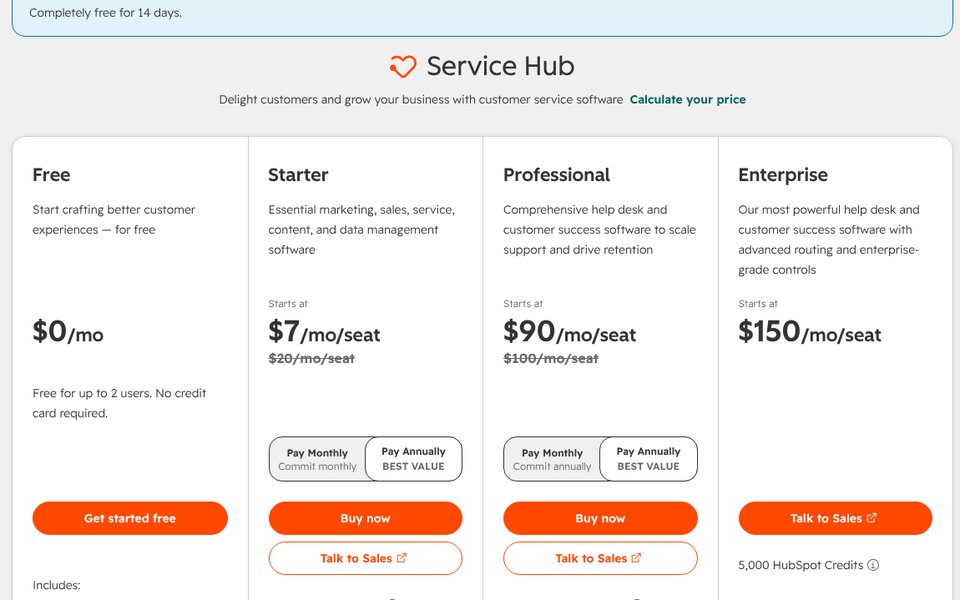
Service Hub is HubSpot's customer service product: ticketing, live chat, a help desk workspace, a knowledge base and the Customer Agent, all on the HubSpot CRM. Paid plans are priced per seat. The plans on October 17, 2026:
| Plan | Price | What you get | What is missing |
|---|---|---|---|
| Free | $0 | Free service tools: ticketing and live chat with HubSpot branding | Up to 2 users; no AI agent |
| Starter | $7 per seat/mo billed yearly ($10 monthly); HubSpot shows both as a discount from $20 | Live chat and meetings without branding, ticketing, calling (500 minutes), Agent Builder, 500 HubSpot Credits a month | No Customer Agent, no knowledge base, no help desk workspace |
| Professional | $90 per seat/mo billed yearly ($100 paid monthly, still on a yearly commitment) + $1,500 one-time onboarding | Customer Agent, help desk and customer success workspaces, knowledge base, customer portal, feedback surveys, 500 macros, 3,000 credits a month | Skill-based routing and conditional SLAs |
| Enterprise | $150 per seat/mo, through sales + $3,500 one-time onboarding | Conditional SLAs, skill-based routing, capacity limits, journey analytics, a sandbox, 5,000 credits a month | None of the above; the price is the catch |
What the Customer Agent costs
The Customer Agent, HubSpot's AI agent that answers in chat, email, forms and calls (voice in beta), is only on Professional and Enterprise. It runs on HubSpot Credits: 50 credits per resolved conversation in text channels, and 50 credits per minute for voice (in beta). Extra credits cost $0.01 each ($10 per 1,000), bought in packs or pay-as-you-go. So a resolved conversation costs $0.50 once the included credits are used. The 3,000 credits in Professional cover up to 60 resolved conversations a month (fewer if other features use credits), and they reset monthly without rolling over. Credits are shared by every feature that uses them, and they are not added up across HubSpot products: you get the allowance of your highest plan. Buying a Professional or Enterprise seat comes with 14 days of free Customer Agent access.
Why teams look for a HubSpot Service Hub alternative
- The AI agent starts at Professional. Starter at $7 has ticketing and chat, but no Customer Agent and no knowledge base. For AI you pay $90 per seat plus $1,500 for onboarding.
- Seats add up fast. Five agents on Professional are $450 a month billed yearly, or $500 paying monthly, before credits.
- Onboarding is mandatory. $1,500 on Professional and $3,500 on Enterprise, paid once, on top of the seats.
- Credits run out. 3,000 credits are 60 resolved conversations. A team where the AI resolves 200 conversations a month buys 7,000 more credits.
- The Starter price is a promotion. HubSpot shows $7 and $10 crossed against $20, so budget for the list price if the offer changes.
- You may not need the whole HubSpot platform. If your sales team does not live in HubSpot, a standalone help desk is often cheaper and simpler.
HubSpot Service Hub alternatives at a glance
| Tool | Best for | Entry price (checked Oct 17, 2026) | How AI is billed | Free plan |
|---|---|---|---|---|
| HubSpot Service Hub (for reference) | Support on the HubSpot CRM | $7 per seat/mo (no Customer Agent); $90 with it | $0.50 per resolved conversation after the included credits | Yes, 2 users |
| CRMsoftware.pro | AI chat + inbox + CRM, users included | $19/mo for up to 8 users | AI messages included (1,000 a month on Launch) | Yes, 3 users, 100 AI messages (AI only) |
| Zendesk | Full help desk at scale | $19 per agent/mo email only; $55 with chat | 5 automated resolutions per agent on Suite Team, then $1.50–$2.00 each | No, free trial |
| Freshdesk | Cheap ticketing help desk | $19 per agent/mo | First 500 AI Agent sessions included, then $49 per 100 | No, free trial |
| Zoho Desk | Lowest seat price | $7 per user/mo (Express) | Zia and AI agents; bring your own LLM key | Yes, 3 users |
| Help Scout | Calm, email-first inbox | $25 per user/mo | AI Answers $0.75 per resolution | Yes, 5 users, 100 contacts a month |
| Intercom (Fin) | AI-first help desk | $29 per seat/mo | $0.99 per Fin outcome | No, free trial |
| Front | Teamwork on shared email | $25 per seat/mo, up to 10 seats | Autopilot from $0.05 per conversation; Copilot $20 per seat | No, free trial |
| Hiver | Support inside Gmail | $25 per user/mo (Hiver Omni) | AI Agents and Copilot listed on every plan | No, free trial |
| Salesforce Service Cloud | Enterprise CRM-based help desk | $25 per user/mo (Starter Suite); $195 for Service Cloud Core | Agentforce for Service bought separately or included on Max | No, free trial |
What 5 agents really pay
A typical Service Hub team: 5 agents, about 1,000 conversations a month, the AI agent takes 300 of them and fully resolves 200, and the team answers the rest. Billed yearly, list prices, before tax.
| Tool and plan | How the bill adds up | Monthly total |
|---|---|---|
| HubSpot Starter | 5 × $7 = $35; no AI agent and no knowledge base, so the team answers all 1,000 conversations | $35 (no AI agent) |
| CRMsoftware.pro Growth | $49 flat for 20 users with 3,000 AI messages, enough for 300 AI conversations at about 3 messages each, plus the team inbox | $49 |
| Zoho Desk Standard | 5 × $14 = $70; AI agent cost depends on your LLM key or Zoho's token allowance | $70 + AI use |
| Hiver Growth | 5 × $25 = $125; AI Agents are listed on every plan, but the pricing page shows no usage price | $125 |
| Front Starter | 5 × $25 = $125 + Autopilot from $0.05 × 300 conversations (pricing through sales); Starter covers one channel type | From $140 |
| Freshdesk Growth | 5 × $19 = $95 + 300 AI sessions at $49 per 100 = $147 once the first 500 included sessions run out (in month 2) | $95 → $242 |
| Help Scout Standard | 5 × $25 = $125 + 200 resolutions × $0.75 = $150 | $275 |
| Intercom Essential | 5 × $29 = $145 + 200 outcomes × $0.99 = $198 | $343 |
| HubSpot Professional | 5 × $90 = $450 + 200 resolutions × 50 credits = 10,000 credits, minus 3,000 included = 7,000 × $0.01 = $70 | $520 + $1,500 once |
| Zendesk Suite Team | 5 × $55 = $275 + 175 resolutions beyond the 25 included × $1.50–$2.00 = $262.50–$350 | $537.50–$625 |
| HubSpot Enterprise | 5 × $150 = $750 + 5,000 credits beyond the 5,000 included × $0.01 = $50 | $800 + $3,500 once |
Spread over the first year, the onboarding fee adds $125 a month to Professional, so year one costs about $645 a month for 5 agents. HubSpot's own Customer Agent is cheap per resolution ($0.50 against $0.75 on Help Scout and $0.99 on Intercom); what makes Service Hub expensive is the $90 seat you need before you can turn the AI on.
The 9 best HubSpot Service Hub alternatives
1. CRMsoftware.pro: best for AI chat plus a CRM at one team price
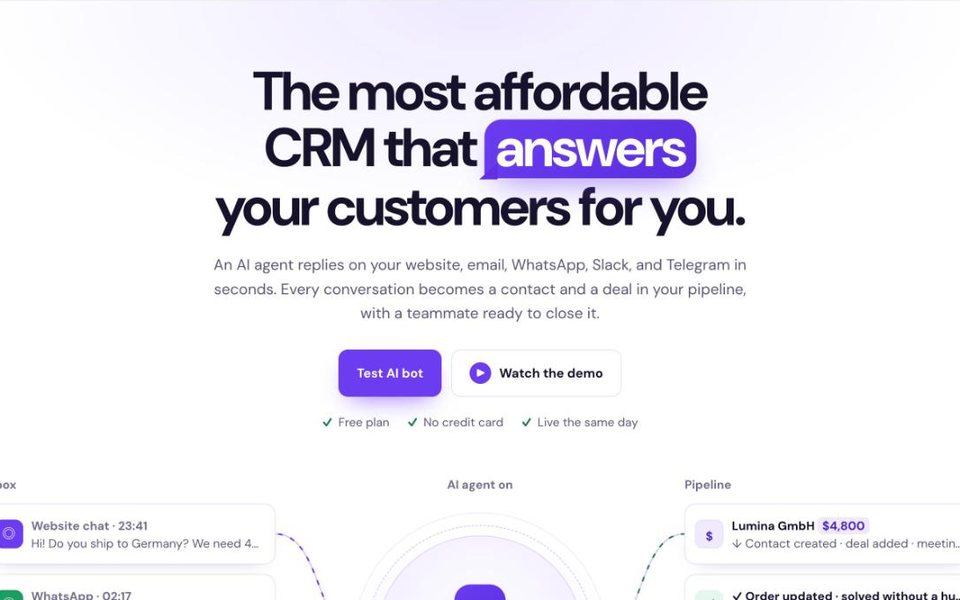
CRMsoftware.pro is our product, so judge this section with that in mind. Like HubSpot, it puts support and the CRM in one place, but the AI agent is in every plan, including the free one, and the price covers the team instead of each seat. The agent answers on your website chat, WhatsApp, Telegram, Instagram, Messenger and Slack, hands over to a person, and conversations turn into contacts and deals in the built-in pipeline. There is no onboarding fee.
Price (Oct 17, 2026): Free for 3 users and 100 AI messages a month (AI only: no human handover or unified inbox). Launch $19/mo billed yearly ($24 monthly) for 8 users, 1,000 AI messages and 2 websites. Growth $49 ($59) for 20 users, 3,000 AI messages, the team inbox with saved replies and auto-translation. Scale $99 ($119) for 50 users and 10,000 AI messages, with the API and HubSpot or Salesforce sync.
Pros: flat price for the whole team; AI messages included on every plan; replies in 95+ languages; CRM pipeline, bookings and AI voice built in; can sync with HubSpot on Scale.
Cons: no classic ticketing with SLAs; the knowledge base is simpler than HubSpot's; far fewer integrations and no marketing suite.
Best for: small sales and support teams that want AI chat, an inbox and a CRM in one bill.
Count your support seats, add the onboarding fee and the credits you buy, and compare with a plan that includes users and AI messages. Start free, no card needed, or see pricing.
2. Zendesk: best full help desk at scale
Zendesk is the classic help desk HubSpot Service Hub competes with: tickets, messaging, phone, a help center and AI agents in one suite, with one of the largest app marketplaces among help desks. It connects to HubSpot if your sales team stays there.
Price (Oct 17, 2026): Support Team $19 per agent a month billed yearly (email and ticketing). Suite Team $55 with messaging, live chat, telephony and AI agents. Suite Professional $115 with SLAs and more. AI agents include a small allowance of automated resolutions per agent (5 on Suite Team), then $1.50 each committed or $2.00 pay-as-you-go (AI resolution rates checked October 8, 2026). See our Zendesk vs Freshdesk comparison for the details.
Pros: scales to large teams; email-only plan at $19; no onboarding fee; huge integration marketplace.
Cons: chat starts at $55 per agent; AI resolutions cost more than HubSpot's $0.50; setup takes time.
Best for: growing support teams that want a dedicated help desk without the HubSpot seat price.
3. Freshdesk: best cheap ticketing help desk
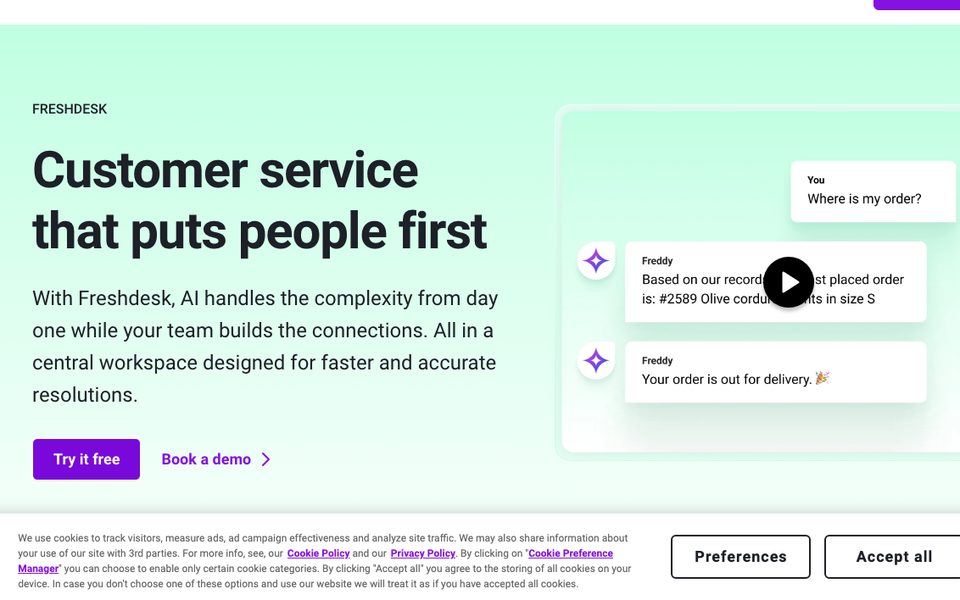
Freshdesk is a full ticketing help desk with a customer portal, knowledge base and Freddy AI. Its entry plan includes the knowledge base and AI sessions that HubSpot keeps for Professional.
Price (Oct 17, 2026): Growth $19 per agent a month billed yearly ($23 monthly) with ticketing, shared inbox, portal and knowledge base. Pro $55 ($66) adds multiple SLAs, intelligent routing and a multilingual help desk. Enterprise $89 ($107). Every plan includes the first 500 Freddy AI Agent sessions; more cost $49 per 100. Freddy AI Copilot is a $29 per agent add-on ($35 monthly) on Pro and Enterprise.
Pros: knowledge base and AI on the first paid plan; low seat price; no onboarding fee.
Cons: AI is billed per session, so conversations the AI does not solve still count; live chat is in Freshdesk Omni, not in Freshdesk Growth; no free plan on the current pricing page.
Best for: teams that want proper ticketing at a fraction of HubSpot Professional.
4. Zoho Desk: best lowest seat price
Zoho Desk is a ticketing help desk with the lowest seat prices in this list, a free plan and the same "suite" idea as HubSpot if you also use Zoho CRM.
Price (Oct 17, 2026, billed yearly): Free for 3 users with email ticketing. Express $7 per user a month, Standard $14, Professional $23 and Enterprise $40. Zoho's AI agents can run on your own LLM key (BYOK).
Pros: very low seat prices; free plan for 3 users; deep Zoho CRM integration.
Cons: the interface is busier than HubSpot's; automation, SLAs and AI start on paid plans; AI agent cost depends on your setup.
Best for: budget-conscious teams and Zoho users.
5. Help Scout: best calm, email-first inbox
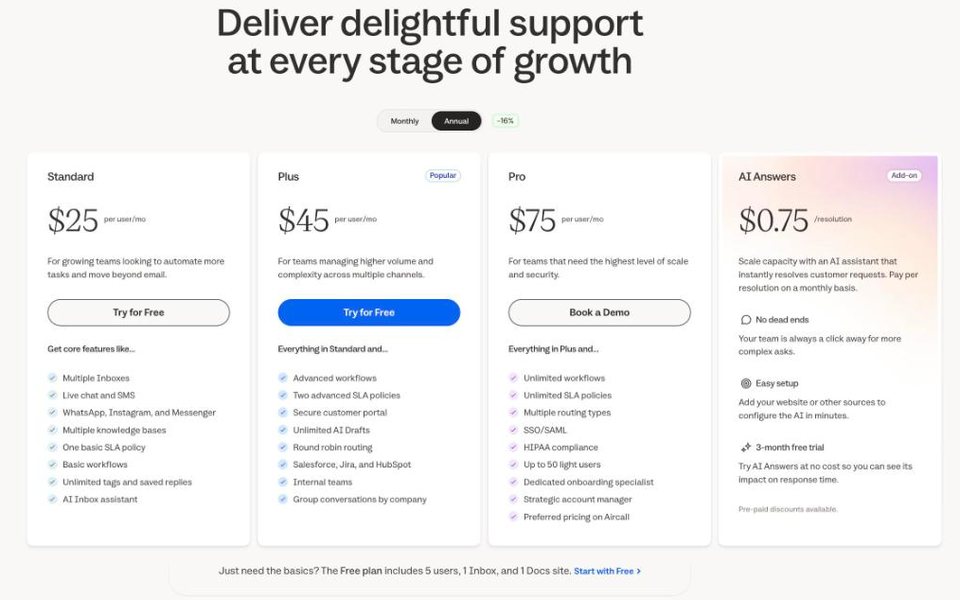
Help Scout is a simple help desk with a shared inbox, live chat, a knowledge base (Docs) and AI Answers. It covers the core of what a small team uses in Service Hub Professional, at a lower seat price and without an onboarding fee.
Price (Oct 17, 2026): free for up to 5 users and 100 contacts a month. Standard $25 per user a month billed yearly ($30 monthly), Plus $45 ($54), Pro $75 ($90) with a 10-user minimum. AI Answers costs $0.75 per resolution. More in our Help Scout alternatives guide.
Pros: knowledge base and live chat on Standard; clean, fast inbox; HubSpot integration on Plus.
Cons: no sales CRM; AI resolutions cost more than HubSpot's; the free plan is small.
Best for: email-first support teams under 25 people.
6. Intercom (Fin): best AI-first help desk
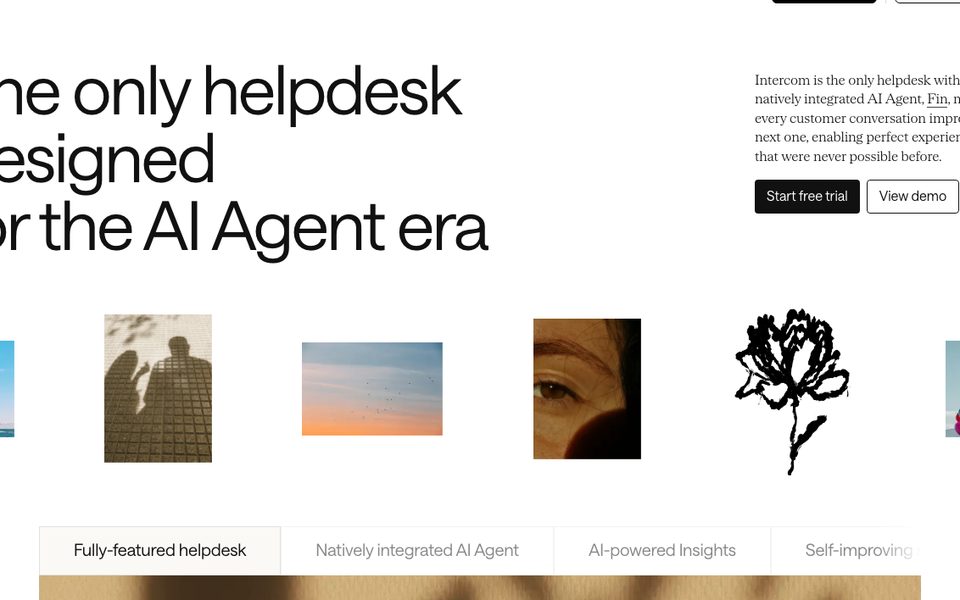
Intercom is the chat-first help desk with one of the most advanced AI agents, Fin. Fin can also run on top of other help desks, so some teams add it to the tool they already use.
Price (Oct 17, 2026): Essential $29 per seat a month billed yearly, Advanced $85, Expert $132. Fin costs $0.99 per outcome on every plan: mostly resolved conversations, but also Procedures that end in a handoff, billed at most once per conversation. See our Intercom vs Zendesk comparison.
Pros: one of the most advanced AI agents; strong messenger and in-app tools; AI available from the first plan.
Cons: $0.99 per outcome is about twice HubSpot's $0.50; seats plus outcomes add up; no free plan.
Best for: chat-first teams that want the AI to resolve a large share of conversations.
7. Front: best for teamwork on shared email
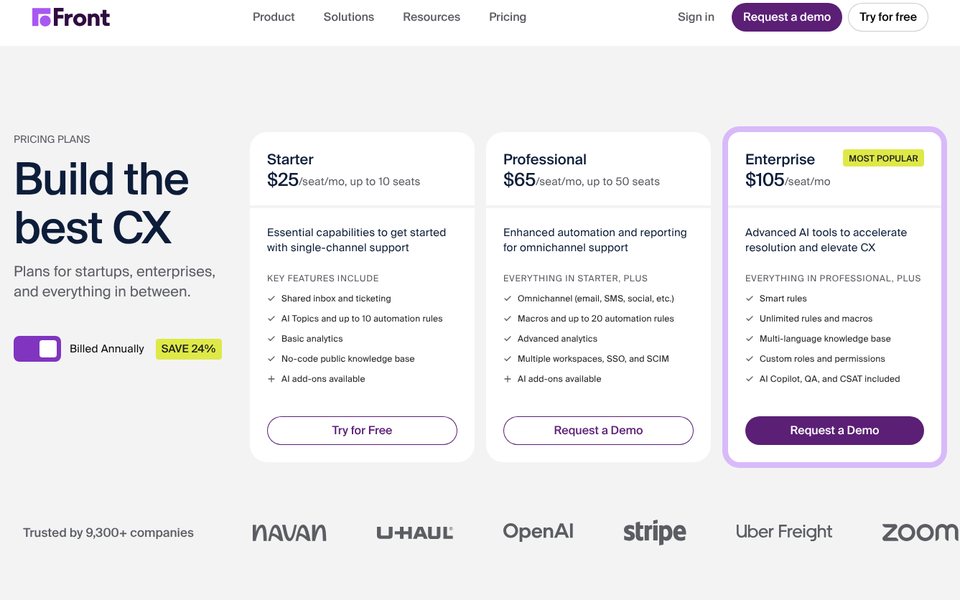
Front looks like email but works like a help desk: shared inboxes, assignments, comments on conversations and rules. It suits teams where support, account managers and operations answer customers together.
Price (Oct 17, 2026): Starter $25 per seat a month billed yearly ($35 monthly) for up to 10 seats and one channel type. Professional $65 ($85) for up to 50 seats, omnichannel, macros and SSO. Enterprise $105 billed yearly with AI Copilot, QA and CSAT included. AI Autopilot starts at $0.05 per conversation through sales; Copilot is $20 per seat on Starter and Professional. More in our Front alternatives guide.
Pros: strong collaboration features; AI agent priced per conversation; syncs with HubSpot and Salesforce.
Cons: Starter covers one channel type only; omnichannel starts at $65 per seat; no free plan.
Best for: teams that collaborate on customer email all day.
8. Hiver: best for support inside Gmail
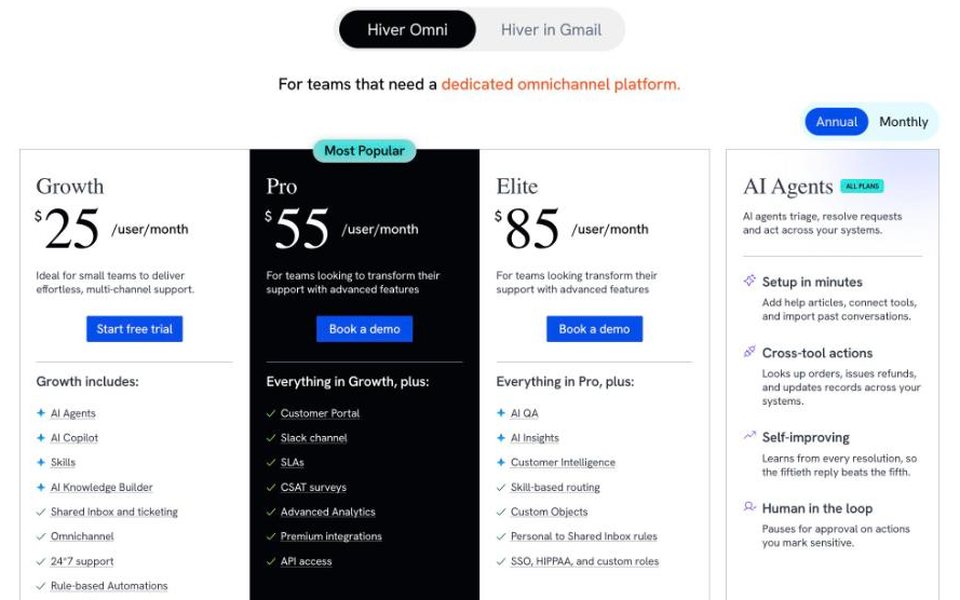
Hiver began as a help desk inside Gmail and now also sells Hiver Omni, a standalone omnichannel platform. If your team works in Google Workspace, it avoids a new tool to learn.
Price (Oct 17, 2026, Hiver Omni): Growth $25 per user a month billed yearly ($35 monthly) with AI Agents, AI Copilot, shared inbox and ticketing, omnichannel and 24/7 support. Pro $55 ($65) adds a customer portal, SLAs, CSAT and API access. Elite $85 ($95) adds AI QA, skill-based routing, SSO and HIPAA.
Pros: AI agents listed from the first plan; works where Gmail users already are; 24/7 support.
Cons: SLAs and API access start at $55; the pricing page does not show what AI agent usage costs; no free plan.
Best for: Google Workspace teams.
9. Salesforce Service Cloud: best enterprise CRM-based help desk
Salesforce is the other big CRM with a service product. It makes sense when you need what HubSpot Enterprise offers and more: complex case management, contact center features and deep customization.
Price (Oct 17, 2026): Starter Suite $25 per user a month (sales, service and marketing basics, billed monthly or yearly), Pro Suite $100 billed yearly. Service Cloud editions, billed yearly: Core $195 per user, Advanced $395 and Max $550, which includes Agentforce for Service. On lower editions, Agentforce for Service is bought separately. The Premier Success Plan costs 30% of net license fees.
Pros: the most configurable platform; enterprise contact center and field service add-ons; huge partner ecosystem.
Cons: the service editions cost far more than HubSpot Professional; needs an admin or partner to set up; AI agents add to the bill.
Best for: large companies already on Salesforce.
Also considered
Gorgias (ecommerce help desk, strongest on Shopify), LiveAgent (cheap help desk with a call center) and Chatwoot (open source, can be self-hosted). They are good picks for those cases but further from what a HubSpot team needs. If you are leaving the whole HubSpot platform, not just Service Hub, read our HubSpot alternatives guide.
Free HubSpot Service Hub alternatives
- HubSpot Free itself: ticketing and live chat for up to 2 users, with HubSpot branding.
- Zoho Desk Free: 3 users with email ticketing.
- CRMsoftware.pro Free: 3 users and 100 AI messages a month; the AI answers, but human handover and the unified inbox start on Launch ($19).
- Help Scout Free: 5 users, 100 contacts a month, 1 Inbox.
- Chatwoot: a free cloud plan for 2 agents, or self-hosted.
When to stay on HubSpot Service Hub
Stay if your marketing and sales teams already work in HubSpot and you need support tickets, deals and marketing emails on the same contact record. That shared view is hard to rebuild with separate tools, and HubSpot's Customer Agent is cheap per resolution at $0.50. Starter at $7 per seat is also a fair price if you only need ticketing and chat without AI. Moving makes sense when Professional seats and onboarding cost more than the shared CRM is worth to you, or when only your support team uses HubSpot.
How to choose
| If you… | Choose |
|---|---|
| want AI chat, an inbox and a CRM at one team price | CRMsoftware.pro |
| need a full help desk for a growing team | Zendesk |
| want proper ticketing at a low seat price | Freshdesk |
| want the lowest seat price or already use Zoho | Zoho Desk |
| mostly answer email in a small team | Help Scout |
| want the AI to resolve as many chats as possible | Intercom (Fin) |
| work together on shared email all day | Front |
| live in Gmail and Google Workspace | Hiver |
| are an enterprise on Salesforce | Salesforce Service Cloud |
How to switch from HubSpot Service Hub
- Export tickets and contacts. In HubSpot you can export tickets and contacts to CSV or Excel from the ticket and contact list views, and pull conversations through the API or a migration service.
- Move the knowledge base. Your articles train the new AI agent, so import them before you switch the AI on.
- Keep HubSpot CRM if sales uses it. Most help desks above connect to HubSpot CRM to show or sync contact data, so you can replace only Service Hub seats.
- Reconnect channels. Forward your support email, replace the HubSpot chat widget, and reconnect WhatsApp, Messenger and phone.
- Check your renewal date. Yearly HubSpot plans run to the end of the term, so time the switch for your renewal and lower your Service seats then.
FAQ
What is the best HubSpot Service Hub alternative?
For small teams that want AI chat, an inbox and a CRM with users and AI messages included, CRMsoftware.pro from $19 a month. For a full help desk, Zendesk. For cheap ticketing, Freshdesk. For the lowest seat price, Zoho Desk. For an email-first team, Help Scout. For an AI-first help desk, Intercom (Fin).
How much does HubSpot Service Hub cost?
On October 17, 2026: Free for up to 2 users; Starter $7 per seat a month billed yearly ($10 monthly), shown as a discount from $20; Professional $90 per seat billed yearly ($100 monthly) plus a $1,500 onboarding fee; Enterprise $150 per seat plus $3,500 onboarding.
How much does the HubSpot Customer Agent cost?
It uses 50 HubSpot Credits per resolved conversation in text channels, which is $0.50 at $0.01 per extra credit. Professional includes 3,000 credits a month (60 resolutions) and Enterprise 5,000. It is not available on Starter.
Does HubSpot Service Hub Starter include AI?
Starter includes 500 HubSpot Credits and Agent Builder, but not the Customer Agent that answers customers, and no knowledge base. Both start on Professional.
Is the HubSpot onboarding fee required?
Yes, according to HubSpot's pricing page: a one-time $1,500 Professional Onboarding and $3,500 Enterprise Onboarding are required and not included in the seat price.
Is Zendesk cheaper than HubSpot Service Hub?
For a full help desk, yes: Zendesk Suite Team is $55 per agent against $90 for Service Hub Professional, with no onboarding fee. AI resolutions are cheaper on HubSpot ($0.50 against $1.50–$2.00), so a busy AI agent narrows the gap.
Can I keep HubSpot CRM and use another help desk?
Yes. Zendesk, Freshdesk, Help Scout (Plus and up), Intercom, Front and Hiver all integrate with HubSpot CRM, and CRMsoftware.pro syncs with HubSpot on its Scale plan. You can keep sales and marketing in HubSpot and move only support.
Which HubSpot Service Hub alternative has a free plan?
Zoho Desk (3 users), Help Scout (5 users, 100 contacts a month), CRMsoftware.pro (3 users with 100 AI messages) and Chatwoot. HubSpot's own free tools cover 2 users.
Sources
- HubSpot Service Hub pricing, checked Oct 17, 2026 (USD), with the monthly and annual options, the plan features and the FAQ on seats and credits.
- HubSpot Product and Services Catalog, HubSpot Credits Rate Sheet (Customer Agent credits, credit price, Service Seats).
- Pricing pages checked Oct 17, 2026: Zendesk, Freshdesk, Zoho Desk, Help Scout, Intercom, Front, Hiver, Salesforce Service Cloud, CRMsoftware.pro.
AI support and a CRM without per-seat pricing
AI chat, a team inbox and a CRM pipeline with users and AI messages included, and no onboarding fee. Free for 3 users; Launch is $19/month billed yearly for 8 users and 1,000 AI messages, Growth $49 for 20 users and 3,000.
Start free See pricing

