


Front costs $25 per seat a month billed yearly for one channel type, and $65 once you need email and chat together. For AI chat, a team inbox and a CRM at one price for the whole team, try CRMsoftware.pro (from $19 a month for 8 users). For a Front-style team email app at a lower price, Missive. For an email-first help desk with a help center and a free plan, Help Scout. For teams that live in Gmail, Hiver, Gmelius or Drag. For a cheap ticketing help desk, Freshdesk. For an AI agent built into the help desk, Intercom (Fin). For enterprise scale, Zendesk.
We checked every price on the vendor's own pricing page on October 12–13, 2026, billed yearly, with monthly prices where we list them (Zendesk's AI resolution prices on October 8). Prices are in US dollars, billed yearly unless we say otherwise, before tax. CRMsoftware.pro is our own product, so we list its limits too. No made-up scores or tests: each tool gets its real price, its pros and cons, and who it suits.
What Front costs in 2026
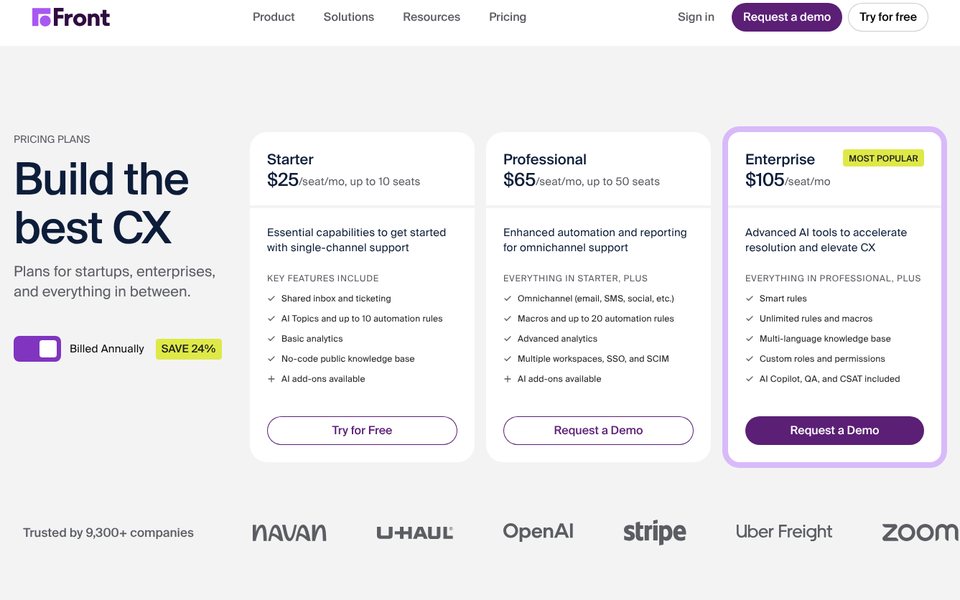
Front is a shared inbox for teams that work with customers over email, chat, SMS and social: assignments, internal comments, shared drafts and rules on top of a familiar email layout, with ticketing, a knowledge base and analytics. Plans are priced per seat, and the AI agent is sold separately. The plans on October 13, 2026:
| Plan | Price per seat/mo | Seats | What you get |
|---|---|---|---|
| Starter | $25 yearly ($35 monthly) | Up to 10 | One channel type only (email, Front Chat or SMS), shared inbox and ticketing, up to 10 automation rules, basic analytics, a basic public knowledge base |
| Professional | $65 ($85) | Up to 50 | Every channel (email, SMS, social, WhatsApp and more), macros and up to 20 rules, advanced analytics, up to 5 workspaces, SSO and SCIM |
| Enterprise | $105, yearly only | No stated limit | Unlimited rules and macros, multi-language knowledge base, custom roles, AI Copilot, Smart QA and Smart CSAT included |
Front's AI comes as add-ons. Copilot, which drafts replies and suggests next steps, is $20 per seat a month on Starter and Professional. Autopilot, Front's AI agent, starts at $0.05 per conversation and is priced through sales. Native WhatsApp on Professional and Enterprise costs Meta's fees plus a 20% admin fee. There is no free plan; the 14-day trial gives you Professional features without a card.
Why teams look for a Front alternative
- Starter covers one channel type. If you answer email and website chat, you need Professional at $65 a seat, 2.6 times the Starter price.
- The 11th seat is expensive. Starter stops at 10 seats, so the 11th person moves the whole team to Professional: 11 × $65 = $715 a month instead of 10 × $25 = $250.
- AI costs extra and is quoted. Copilot adds $20 per seat, and Autopilot's price comes from sales, so you cannot see the full bill before you talk to them.
- Enterprise is yearly only, and every seat in the organization must be on the same plan.
- No free plan. Small teams that only need a shared Gmail inbox pay for features they never open.
Front alternatives at a glance
| Tool | Best for | Entry price (checked Oct 12–13, 2026) | How AI is billed | Free plan |
|---|---|---|---|---|
| Front (for reference) | Team collaboration on email | $25/seat/mo (one channel type); $65 for every channel | Autopilot from $0.05 per conversation, through sales; Copilot $20/seat | No, 14-day trial |
| CRMsoftware.pro | AI chat + inbox + CRM, users included | $19/mo for up to 8 users | AI messages included (1,000 a month on Launch) | Yes, 3 users, 100 AI messages (AI only) |
| Missive | Front-style team email app for less | $14/user/mo, up to 5 users | AI drafts with Missive credits or your own key; no customer-facing AI agent | No, 30-day trial |
| Help Scout | Email-first help desk with a help center | $25/user/mo, email and chat included | AI Answers $0.75 per resolution | Yes, 5 users, 100 contacts a month |
| Hiver | Help desk inside Gmail | $25/user/mo, from 2 seats | AI agents listed on every plan; no usage price on the pricing page | No, 7-day trial |
| Gmelius | Gmail shared inboxes with AI assistants | $25/user/mo for shared inboxes ($19 for the AI assistant alone) | AI work included in the seat price, with usage caps | No, 7-day trial |
| Drag | Low-cost Gmail shared inbox with live chat (early access) | $12/user/mo | AI credits on Starter; Varley AI included on Plus and Pro | No, 7-day trial |
| Freshdesk | Budget ticketing help desk | $19/agent/mo ($29 with live chat in Omni) | 500 AI sessions included once, then $49 per 100 | $0 for 1–2 agents for 6 months |
| Intercom (Fin) | AI agent built in, billed per outcome | $29/seat/mo (some visitors see $19) | $0.99 per Fin outcome | No, 14-day trial |
| Zendesk | Enterprise help desk | $19/agent/mo (email only); $55 with chat | 5 automated resolutions per agent included on Suite Team, then $1.50–$2.00 each | No, 14-day trial |
What a 5-person team really pays
Many Front teams work mostly in email. So here is one realistic month: 5 people, 1,000 conversations (700 emails and 300 website chats), the AI answers every chat first and fully resolves 150 of them, and people handle everything else. Billed yearly, list prices, before tax, on the cheapest plan where an AI can answer website chat and hand over to people.
| Tool and plan | How the bill adds up | Monthly total |
|---|---|---|
| CRMsoftware.pro Growth | $49 flat for 20 users and 3,000 AI messages; 300 AI chats use about 900 at 3 AI messages each. Growth, not Launch ($19), because saved replies for the email side start on Growth | $49 |
| Drag Pro | 5 × $24 = $120, with Varley Agents and monthly AI credits included (Plus at $18 has Varley in live chat but not Varley Agents; live chat is marked early access); top-ups cost extra | From $120 |
| Hiver Growth | 5 × $25 = $125; AI agents are listed on every plan with no usage fee on the pricing page (the page does not confirm live chat on Growth) | From $125 |
| Help Scout Standard | 5 × $25 = $125 + 150 AI resolutions × $0.75 = $112.50 | $237.50 ($125 during the 3-month AI trial) |
| Freshdesk Omni Growth | 5 × $29 = $145 + 300 AI sessions; the first 500 are free once, then 3 × $49 = $147 a month | $292 (after the free sessions) |
| Intercom Essential | 5 × $29 = $145 + 150 resolved chats × $0.99 = $148.50; chats Fin cannot solve cost nothing | $293.50 ($243.50 at the $19 seat price) |
| Front Professional | 5 × $65 = $325 (Starter allows one channel type) + Autopilot from 300 chats × $0.05 = $15, quoted by sales | From $340 |
| Zendesk Suite Team | 5 × $55 = $275 + 125 resolutions beyond the 25 included × $1.50–$2.00 = $187.50–$250 | $462.50–$525 |
Front Professional costs about seven times CRMsoftware.pro and almost three times Drag Pro for this team. Help Scout, Freshdesk and Intercom land in the middle, and Zendesk costs the most because each automated resolution beyond the included ones is $1.50–$2.00. Missive and Gmelius are not in the table because their pricing pages list no website chat widget; for email alone, 5 people pay $70 on Missive Starter and $125 on Gmelius Growth. Your numbers will differ, so try our free AI chatbot pricing calculator, and the live chat staffing calculator to see how many people your chat volume needs.
What a shared email inbox costs as the team grows
Many teams use Front only for shared email. Seats only, billed yearly, no AI, on the cheapest paid plan with a shared email inbox:
| Tool and plan | 3 people | 10 people | 25 people |
|---|---|---|---|
| CRMsoftware.pro (flat price per team) | $49 (Growth; saved replies are listed from Growth, Launch is $19) | $49 (Growth, up to 20 users) | $99 (Scale, up to 50 users) |
| Drag Starter ($12) | $36 | $120 | $300 |
| Missive Starter ($14, up to 5) / Productive ($24) | $42 | $240 | $600 |
| Freshdesk Growth ($19) | $57 | $190 | $475 |
| Help Scout Standard ($25) | $75 | $250 | $625 |
| Gmelius Growth ($25) | $75 | $250 | $625 |
| Hiver Growth ($25) | $125 (seats come in 2, 5, then steps of 5) | $250 | $625 |
| Front Starter ($25, up to 10) / Professional ($65) | $75 | $250 | $1,625 |
At 10 people Front Starter costs the same as Help Scout, Gmelius and Hiver ($250), and more than Drag, Freshdesk and Missive. At 25 people it costs more than twice as much as those three, because Starter stops at 10 seats and Professional is $65.
The 9 best Front alternatives
1. CRMsoftware.pro: best for AI chat plus a CRM at one team price
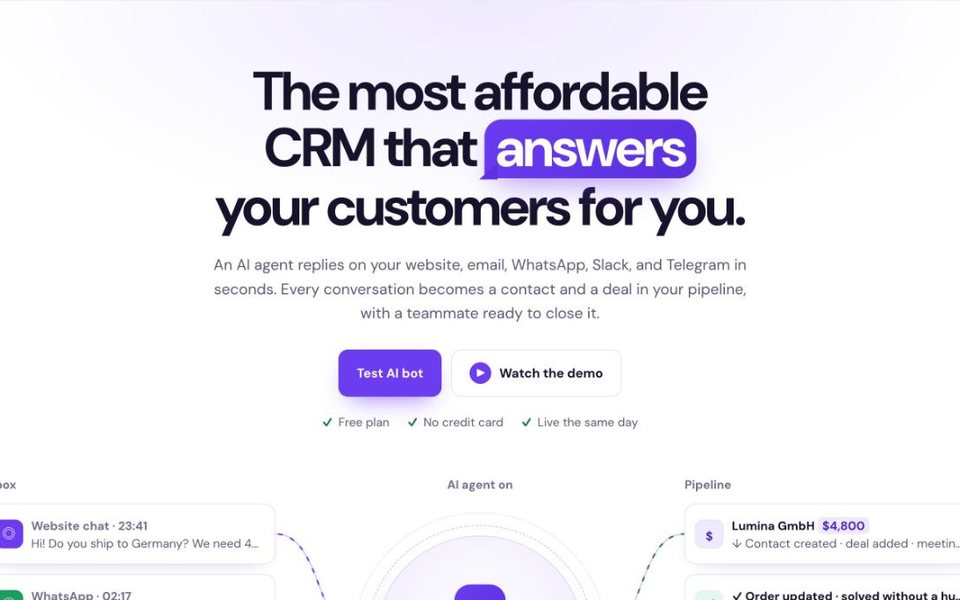
CRMsoftware.pro is our product, so judge this section with that in mind. Where Front charges per seat and sells its AI agent through sales, CRMsoftware.pro charges one price for the team with AI messages included. The AI agent answers on your website, email, WhatsApp, Telegram and Slack, hands over to a person in the shared inbox, and every conversation becomes a contact and a deal in the CRM pipeline. AI voice agents and bookings are part of the product; check which plan you need for them.
Price (Oct 13, 2026): Free for 3 users and 100 AI messages a month (AI only: no human handover or unified inbox). Launch $19/mo billed yearly ($24 monthly) for 8 users, 1,000 AI messages, 2 websites, human handover and a unified inbox. Growth $49 ($59) for 20 users, 3,000 AI messages, 5 websites, team inbox with saved replies and auto-translation. Scale $99 ($119) for 50 users and 10,000 AI messages.
Pros: flat price for the whole team; AI messages included on every plan; CRM pipeline and bookings built in; WhatsApp, Instagram and Messenger from Launch.
Cons: not built for long internal email threads the way Front is; no public help center or SLA policies; far fewer integrations than Front.
Best for: small sales and support teams that want AI answers and a CRM in one bill, and handle more chat than long email threads.
Add up last month's Front seats and add-ons, then compare them with a flat plan that includes AI messages. Start free, no card needed, or see pricing.
2. Missive: a Front-style team inbox for less
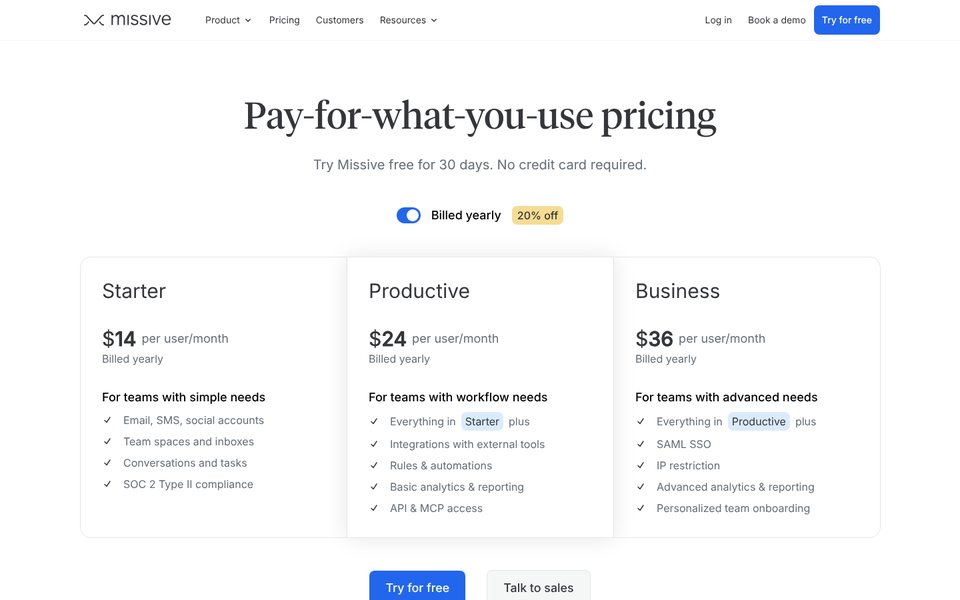
Missive works the way Front does: shared and personal inboxes in one app, internal chat on every thread, collaborative drafts, assignments, tasks and rules, plus SMS, WhatsApp, Messenger and Instagram. It is a team email app rather than a help desk; Productive costs about a third of Front Professional's seat price.
Price (Oct 12–13, 2026): Starter $14/user/mo billed yearly ($18 monthly) for up to 5 users. Productive $24 ($30) for up to 50 users with integrations, rules, analytics and API access. Business $36 ($45) with SSO, IP restrictions and advanced analytics. AI drafts, summaries and rules run on Missive AI credits or your own Anthropic, OpenAI or Gemini key. 30-day trial of Productive without a card; Missive publishes a guide for moving from Front.
Pros: works much like Front; email, SMS and social accounts on every plan; desktop and mobile apps; long trial.
Cons: the pricing page lists no help center, website chat widget or AI agent that answers customers; Starter stops at 5 users; rules and integrations need Productive.
Best for: teams that use Front as a shared email client and want the same feel for less.
3. Help Scout: email-first help desk with a free plan
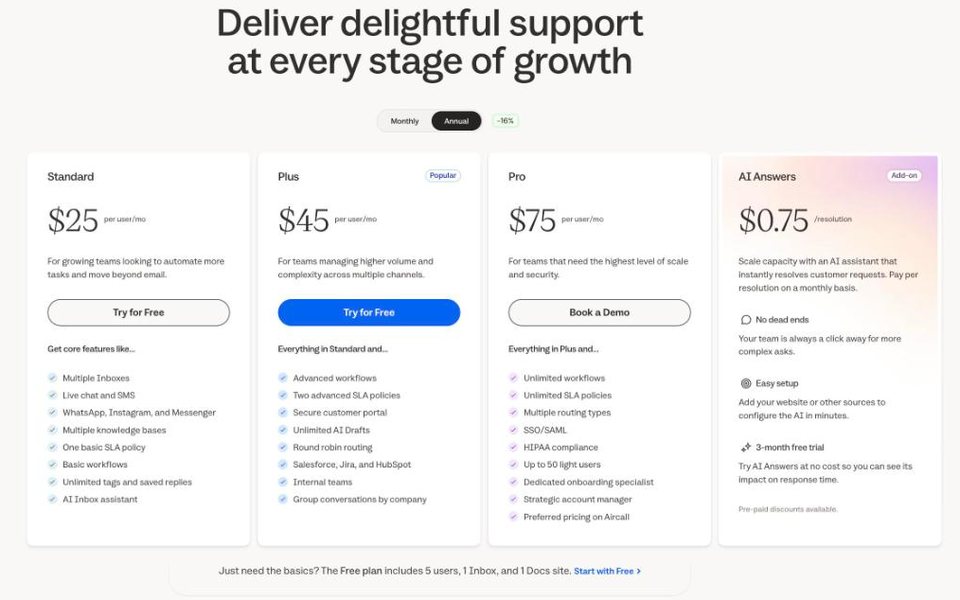
Help Scout is a calm shared inbox for email, live chat, SMS, WhatsApp, Instagram and Messenger, with Docs help centers and Beacon, a help widget for your website. Unlike Front Starter, its cheapest paid plan already covers email and chat together.
Price (Oct 12, 2026): Free for up to 5 users, 1 inbox, 1 Docs site and 100 contacts a month. Standard $25/user/mo billed yearly ($30 monthly), up to 25 users. Plus $45 ($54), up to 50 users. Pro $75 ($90), minimum 10 users. AI Answers $0.75 per resolution with a 3-month free trial. 15-day trial.
Pros: email and chat on the entry paid plan; help center included; AI billed only for resolved conversations; a free plan to start.
Cons: built for support queues rather than the team's personal email; Help Scout's docs describe AI Answers only in the Beacon widget; Standard stops at 25 users.
Best for: support teams that want a help desk with a help center rather than a team email client. See our Help Scout alternatives for a closer look.
4. Hiver: best help desk inside Gmail
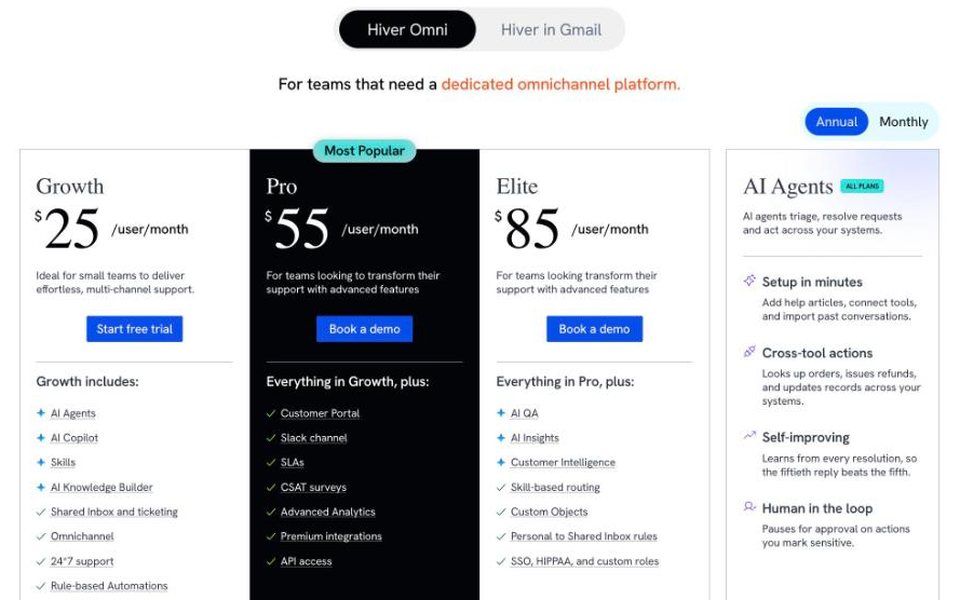
Hiver comes in two versions at the same price: Hiver in Gmail, which turns Gmail into a shared help desk, and Hiver Omni, a standalone app for email, live chat, WhatsApp, voice and social. AI agents and an AI copilot are listed on every plan.
Price (Oct 12, 2026): Growth $25/user/mo billed yearly ($35 monthly) with AI agents, AI Copilot, shared inbox and ticketing. Pro $55 ($65) adds a customer portal, SLAs, CSAT surveys and API access. Elite $85 ($95) adds AI QA, skill-based routing, SSO and HIPAA. Voice is $30 per voice seat. Plans start at 2 seats, then 5, then steps of 5. 7-day trial of Elite, free migration help.
Pros: agents never leave Gmail; AI agents listed without a usage fee on the pricing page; SOC 2, ISO 27001 and HIPAA.
Cons: SLAs need Pro; seat steps of 5 mean a 3-person team pays for 5; the pricing page does not say which channels each plan includes.
Best for: Google Workspace teams that want help-desk features without leaving Gmail.
5. Gmelius: Gmail shared inboxes with AI assistants
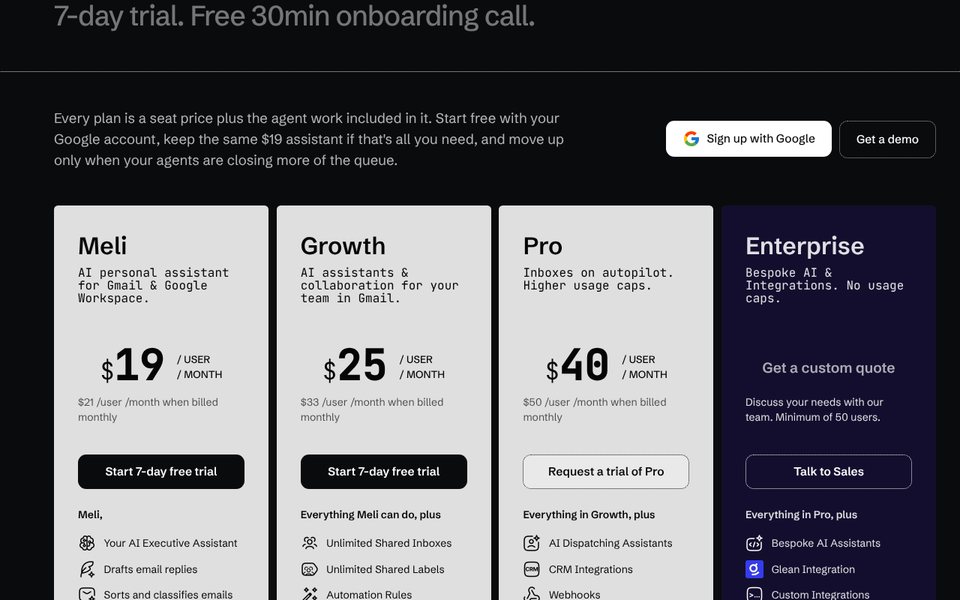
Gmelius adds shared inboxes, shared labels, automation rules and email analytics to Gmail, with AI assistants that draft replies, sort email and schedule meetings (AI dispatching is on Pro). Each plan is a seat price with a set amount of AI work included.
Price (Oct 13, 2026): Meli $19/user/mo billed yearly ($21 monthly), a personal AI assistant for Gmail. Growth $25 ($33) adds unlimited shared inboxes, shared labels, automation rules, auto-assignment, shared templates, SLA and email analytics. Pro $40 ($50) adds AI dispatching, CRM integrations, webhooks, team analytics and higher usage caps. Enterprise is quoted, minimum 50 users. 7-day trial.
Pros: works inside Gmail; AI assistants included in the seat price; SLA analytics on Growth.
Cons: Gmail and Google Workspace only; usage caps on AI work below Enterprise; the pricing page lists no website chat or help center.
Best for: Google Workspace teams that mostly need shared email with AI help.
6. Drag: low-cost Gmail shared inbox with a help center
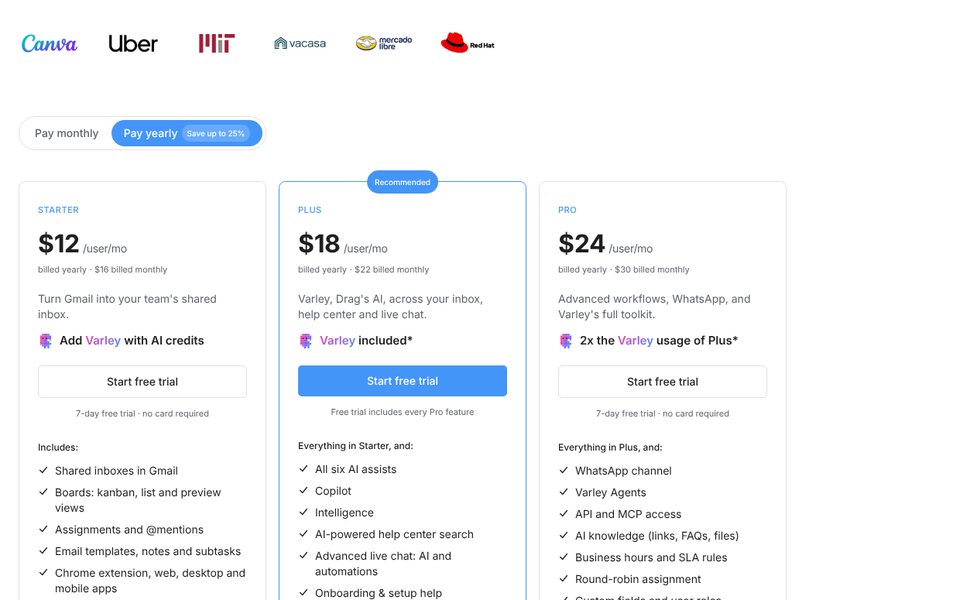
Drag turns Gmail into a shared inbox with Kanban boards, assignments and notes, and every plan includes a help center and live chat (marked early access in Drag's feature table). Varley, Drag's AI, drafts, summarizes and classifies email, and works in the help center and live chat from Plus.
Price (Oct 13, 2026): Starter $12/user/mo billed yearly ($16 monthly) with shared inboxes, boards, a help center, live chat and 10 automation rules; Varley through AI credits. Plus $18 ($22) includes Varley across inbox, help center and live chat, plus unlimited rules and email sequences. Pro $24 ($30) adds WhatsApp, Varley Agents, API and MCP access, business hours and SLA rules, and round-robin assignment. No seat minimums. 7-day trial without a card.
Pros: lowest seat price among the nine with a help center; AI included from Plus; no seat minimums; email stays in Gmail.
Cons: Gmail only; live chat is still early access; AI usage is capped by monthly credits; WhatsApp, Varley Agents and SLA rules need Pro.
Best for: small Gmail teams that want Front's shared inbox and a help center on a tight budget.
7. Freshdesk: best budget ticketing help desk
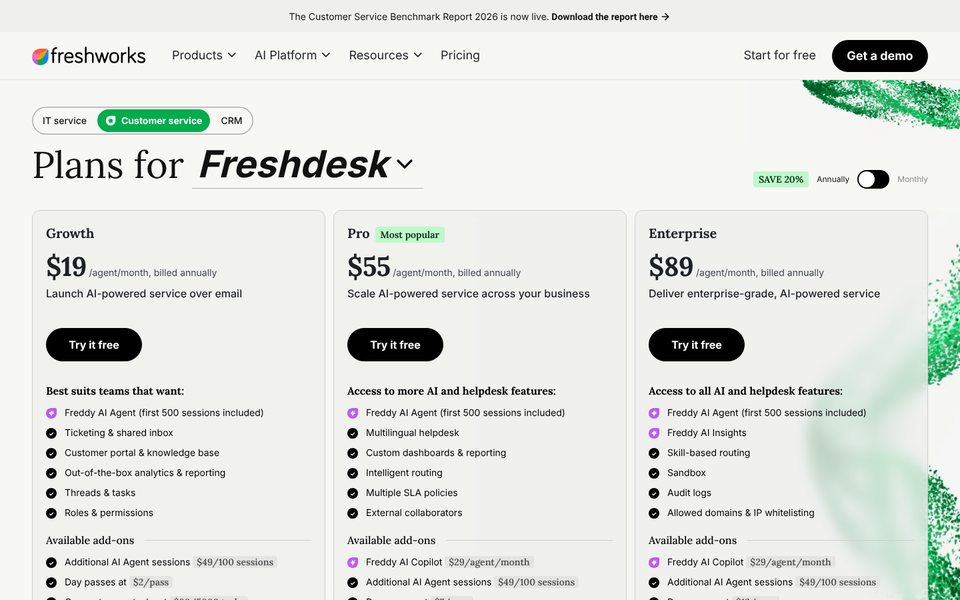
Freshdesk is a classic ticketing help desk with a customer portal, knowledge base, SLAs and the Freddy AI Agent. Freshdesk covers email and web tickets; Freshdesk Omni adds live chat and messaging apps in the same seat.
Price (Oct 13, 2026): Freshdesk Growth $19/agent/mo billed yearly, Pro $55, Enterprise $89. Freshdesk Omni Growth $29, Pro $79, Enterprise $119 (checked Oct 12). Every paid plan gets 500 Freddy AI Agent sessions once, then $49 per 100; a session is all of a customer's chats with the bot in 24 hours. Freddy AI Copilot is $29/agent/mo on Pro and Enterprise. The free plan is $0 for 1–2 agents for 6 months. 14-day trial.
Pros: real tickets, SLAs and a portal at a low seat price; Omni puts chat and email in one seat.
Cons: sessions are counted per 24-hour window, not per resolution; the 500 free sessions are one-time; it feels like a ticketing tool, not an email client.
Best for: growing support teams that want structured tickets and SLAs on a budget.
8. Intercom (Fin): best AI agent built into the help desk
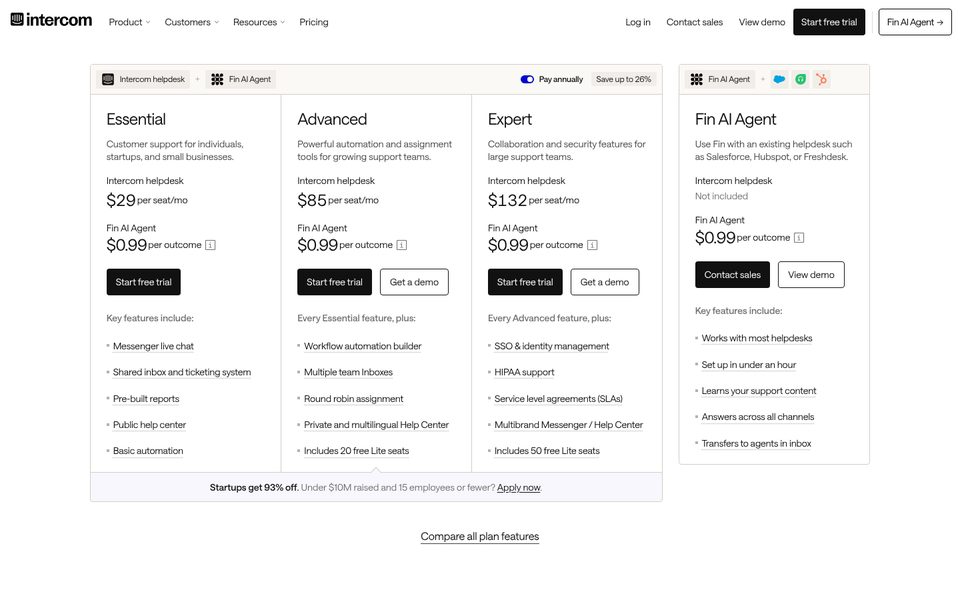
Intercom is now sold by Fin, the company's name since May 2026, and Salesforce completed its acquisition of Fin on September 10, 2026. The product is the Intercom helpdesk with the Fin AI Agent built in, working across chat, email and other channels and billed per result.
Price (Oct 12, 2026): Essential $29/seat/mo billed yearly on the US page; some visitors see $19 ($29 monthly), and we saw both prices in October 2026. Advanced $85 ($99 monthly), Expert $132 ($139). Fin $0.99 per outcome on every plan. 14-day trial without a card.
Pros: an AI agent that also answers email, with a published per-outcome price; help center, tickets and messenger in one; mature integrations.
Cons: no free plan; built around the messenger and help desk rather than shared email; Advanced and Expert seats are expensive.
Best for: SaaS teams that want AI answers in chat and email and can pay per solved conversation.
9. Zendesk: best enterprise help desk
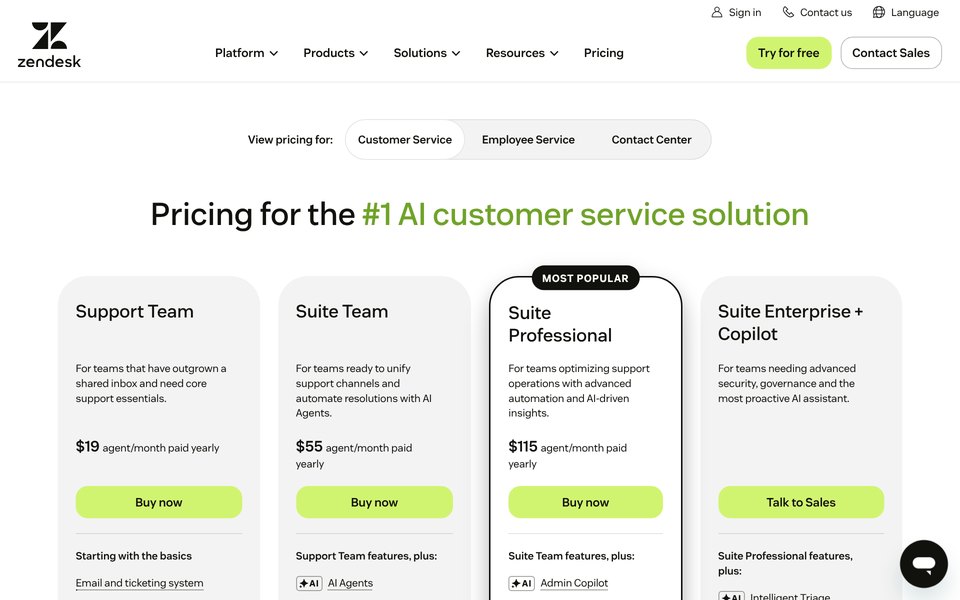
Zendesk is the enterprise answer: email, tickets, messaging, live chat, phone, a knowledge base and AI agents in one suite. The cheapest plan, Support Team, is email and tickets; live chat and messaging start on Suite Team. Zendesk says AI agents are included in every Suite and Support plan, billed by the resolutions they deliver.
Price (Oct 13, 2026): Support Team $19/agent/mo billed yearly. Suite Team $55 with messaging, live chat, phone and a knowledge base, including 5 automated resolutions per agent a month. Suite Professional $115 with 10 included resolutions and Admin Copilot. Extra automated resolutions cost $1.50 each with a volume commitment or $2.00 pay-as-you-go (checked Oct 8). Copilot for agents $50/agent/mo. 14-day trial.
Pros: every channel and a deep ticketing system; strong reporting and permissions; scales to large teams.
Cons: chat starts at $55 a seat; setup takes real work; extra AI resolutions cost two to almost three times Help Scout's $0.75.
Best for: mid-size and larger teams that need a full help desk and reporting.
Also considered
Zoho TeamInbox is the cheapest desktop shared inbox we found: US$5 per user a month billed yearly on Starter (3 shared channels) and US$7.50 on Professional (5 shared channels, analytics), with a 14-day trial; Zoho also sells mobile-only plans from US$0.99 a month. It covers shared email well but has fewer help-desk and AI features than the tools above.
Free Front alternatives
Front has no free plan. If you need one, these are the free options that matter on October 13, 2026:
| Tool | Free plan | Catch |
|---|---|---|
| Help Scout | 5 users, 1 inbox, 1 Docs site | 100 contacts a month; 10 saved replies, tags and articles |
| Freshdesk | 1–2 agents | Free for 6 months only; no free AI sessions |
| CRMsoftware.pro | 3 users, 100 AI messages a month, website chat | AI only: no human handover or team inbox until Launch ($19) |
Missive, Drag, Gmelius and Hiver offer free trials (7 to 30 days) instead of a free plan.
When to stay on Front
- You need one channel type and up to 10 seats. Starter at $25 a seat is fair value for a shared email inbox with ticketing and a knowledge base.
- Your team works across many inboxes and departments. Front's workspaces, rules, shared drafts and analytics on Professional are hard to match in Gmail add-ons.
- You already pay for Enterprise. Copilot, Smart QA and Smart CSAT are included there, so only Autopilot is extra.
How to choose
- Decide if you need a help desk or a team email app. Missive, Gmelius and Drag feel like email; Help Scout, Freshdesk, Zendesk and Intercom are help desks with tickets and help centers.
- Check where your team works. Hiver, Gmelius and Drag live in Gmail. Outlook teams should look at Missive, Help Scout or a standalone help desk.
- Price email and chat together. Front Starter is one channel type, Freshdesk needs Omni for live chat and Zendesk needs Suite for chat; Help Scout and Drag include chat on their entry plans.
- Count your people. Per-seat tools cost more with every hire, and Front's 11th seat triggers Professional. CRMsoftware.pro only moves up a plan when you pass 8 or 20 users (Scale covers 50) or its AI message limit.
- Run a 2-week trial with real conversations and compare cost per conversation and response times, not feature lists.
How to switch from Front
- Request your data export early. Front's export is a request to Front Support by a company admin; Front says it acknowledges requests within 72 hours. The export covers shared inbox conversations, messages, discussions, comments and attachments, as CSV files by inbox (messages optionally as EML). Individual inboxes, contacts, message templates and tags are not included, and the knowledge base is a separate request.
- Copy what the export leaves out. Save your message templates, tags and rules by hand; our customer service email templates and live chat canned responses are a quick start. Missive publishes a guide for moving from Front.
- Set handover rules. Decide when the AI passes a conversation to a person and who gets it; our human handover playbook has the rules we use, and the FAQ knowledge base starter helps train the AI.
- Switch the channels. Point email forwarding at the new tool, replace the Front Chat snippet on your site, and reconnect SMS, WhatsApp and social accounts.
- Keep Front read-only for a month and compare the first full bill with the tables above before you cancel.
FAQ
What is the best Front alternative?
For small teams that want AI chat, a team inbox and a CRM at one price, CRMsoftware.pro from $19 a month for 8 users. For a Front-style team email app at a lower price, Missive. For an email-first help desk with a help center, Help Scout. For Gmail teams, Hiver, Gmelius or Drag. For enterprise scale, Zendesk.
How much does Front cost in 2026?
On October 13, 2026: Starter $25 per seat a month billed yearly ($35 monthly) for up to 10 seats and one channel type, Professional $65 ($85) for up to 50 seats and every channel, and Enterprise $105, yearly only. Copilot is $20 per seat on the lower plans, and Autopilot is priced through sales from $0.05 per conversation.
Does Front have a free plan?
No. Front offers a 14-day trial of Professional features without a card. Free alternatives include Help Scout (5 users, 100 contacts a month), Freshdesk ($0 for 1–2 agents for 6 months) and CRMsoftware.pro (3 users with 100 AI messages).
Is Missive cheaper than Front?
Yes. Missive is $14, $24 or $36 per user a month billed yearly, and every plan includes email, SMS and social accounts. Five people on Missive Productive pay $120 a month, against $325 on Front Professional, the Front plan with more than one channel type. Missive's pricing page lists no help center or chat widget, though.
What is the cheapest Front alternative?
Per user, Zoho TeamInbox at US$5 a month billed yearly (desktop plans), then Drag at $12 with a help center, and Missive at $14 for up to 5 users. If you want AI included, CRMsoftware.pro Launch is $19 a month for up to 8 users with 1,000 AI messages.
What is the best Front alternative for Gmail?
Hiver if you want a help desk with SLAs and a customer portal, Gmelius if you want shared inboxes with AI assistants, and Drag if you want the lowest price with a help center (its live chat is in early access). All three keep your email in Gmail.
Which Front alternative includes AI without extra fees?
Drag includes Varley AI on Plus and Pro, Gmelius includes AI work in the seat price up to usage caps, and CRMsoftware.pro includes AI messages in the plan. Hiver lists AI agents on every plan but shows no usage price, so confirm with sales. Help Scout, Intercom, Freshdesk and Zendesk bill AI per resolution or session.
Can I export my data from Front?
Yes, by request. A company admin asks Front Support for an account data export, and Front says it acknowledges requests within 72 hours. You get shared inbox conversations, messages, comments and attachments; individual inboxes, contacts, templates and tags are not included.
Sources
- Front pricing, checked Oct 13, 2026, monthly and annual, including the plan comparison, AI add-ons and FAQ; Front: How to export your team's Front account data (edited Jul 6, 2026).
- Pricing pages checked Oct 13, 2026 (Missive monthly prices on Oct 12): Missive, Gmelius, Drag, Freshdesk, Zendesk, Zoho TeamInbox, CRMsoftware.pro.
- Checked Oct 12, 2026: Help Scout, Hiver, Intercom, Freshdesk Omni; Help Scout: About AI Answers.
- Freddy AI Agent sessions FAQs (updated Aug 12, 2026); Salesforce completes acquisition of Fin, Sep 10, 2026; Zendesk automated resolution prices checked Oct 8, 2026.
One price for the team, AI included
AI answers, a team inbox and a CRM pipeline without per-seat or per-resolution fees. Free for 3 users; Launch is $19/month billed yearly for 8 users and 1,000 AI messages, Growth $49 for 20 users and 3,000.
Start free See pricing

