


Trengo starts at €299 a month billed yearly (about $335) for 10 users and 6,000 conversations a year. That works for a team of 8–10, but a small team pays for seats it doesn't use, and AI conversations cost €0.25 each on top.
For AI chat, a shared inbox and a CRM from $19 a month (team inbox with saved replies from $49), try CRMsoftware.pro. For WhatsApp-first sales teams, respond.io or SleekFlow.
For an email-heavy shared inbox, Front or Missive. For a flat price per workspace, Crisp.
For chat inside a Freshworks stack, Freshchat. For a full help desk with ticketing, Zendesk. For an AI-first help desk built around its own AI agent, Intercom (Fin).
We checked every price on the vendor's own pricing page on October 24, 2026, in US dollars, billed yearly unless we say otherwise, before tax.
Trengo prices in euros. The USD switch on its pricing page only converts the euro prices with a live exchange rate, so we quote euros and add dollars at €1 = $1.12, the rate on October 24, 2026.
CRMsoftware.pro is our own product, so we list its limits too. No made-up scores or tests: each tool gets its real price, its pros and cons, and who it suits.
What Trengo costs in 2026
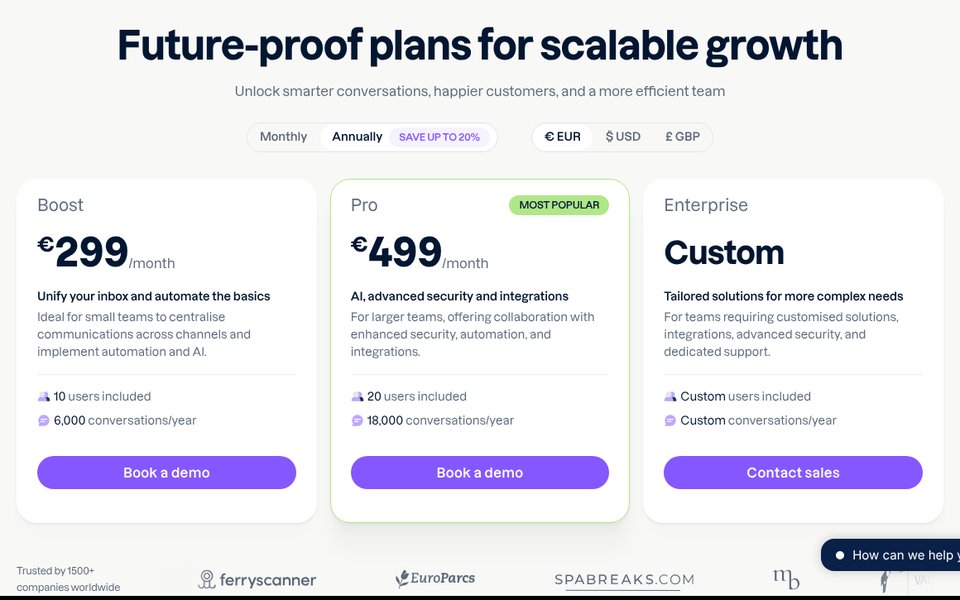
Trengo is an omnichannel team inbox: email, WhatsApp, Instagram, Facebook, live chat, SMS and voice in one place, with automations and an AI agent called HelpMate. It is priced per plan, with a set number of users and conversations included.
A conversation is any reply to a customer within a 7-day window. If the same customer writes again after 7 days, that counts as a new conversation. The plans on October 24, 2026:
| Plan | Price | Users included | Conversations included | What you get |
|---|---|---|---|---|
| Boost | €299/mo billed yearly (about $335); €349 monthly (about $391) | 10 | 6,000 a year on yearly billing; 500 a month on monthly | Shared inbox for all channels, WhatsApp Business API, HelpMate AI agent, automations, email and messaging support |
| Pro | €499/mo billed yearly (about $559); €599 monthly (about $671) | 20 | 18,000 a year on yearly billing; 1,500 a month on monthly | Everything in Boost, plus API actions from AI flows, the option to make 2FA mandatory, phone support |
| Enterprise | Custom | Custom | Custom | Dedicated success manager, custom-built integrations, fully integrated voice, custom users and conversations |
Add-ons, billed yearly (monthly in brackets): 100 more conversations cost €15 (€18). An extra user costs €25 (€30) on Boost and €40 (€50) on Pro. Voice calling and broadcasting are paid add-ons.
AI is billed per conversation. Any conversation that uses HelpMate costs €0.25 on yearly billing (€0.30 monthly).
Boost includes 600 suggested-reply conversations a year (50 a month), and Pro includes 1,200 (100 a month). Conversations the AI answers on its own (Autopilot) are charged per use: on Boost from the first one, on Pro once the included amount is used.
WhatsApp: Trengo says the first 1,000 WhatsApp service messages per phone number each month are free, and Meta charges per message after that. AI Journeys are in beta, and Trengo says their pricing may change.
There is no free plan. The trial is limited to 100 AI conversations, and the pricing page doesn't state its length.
You will still see older Trengo prices on review sites, such as per-agent plans from $18 or Boost at €185. Those are out of date.
Why teams look for a Trengo alternative
- High entry price for small teams. The cheapest plan is €299 a month for 10 users. A 3-person team pays for 7 seats it doesn't need.
- Two meters to watch. You pay for conversations and AI conversations on top of the plan. Busy months mean top-ups.
- Price changes. On Capterra, one reviewer writes "Pricing is extremely unstable". Trengo scores 4.0 out of 5 for value for money there, from 25 ratings.
- Support speed. Capterra reviews also mention slow support ("Customer support is slow and inneficient") and missed notifications. Customer service scores 3.9.
- Paid extras. Voice and broadcasting are add-ons, and AI actions that call other tools (API actions) start on Pro.
To be fair, reviewers like Trengo too. It holds 4.3 out of 5 from 246 reviews on G2, and Capterra users praise having all channels in one place and an easy interface.
Trengo alternatives at a glance
| Tool | Best for | Entry price (checked Oct 24, 2026) | How AI is billed | Free plan |
|---|---|---|---|---|
| Trengo (for reference) | Omnichannel inbox for 10+ users | €299/mo (about $335) for 10 users | €0.25 per AI conversation | No, trial |
| CRMsoftware.pro | AI chat + inbox + CRM, users included | $19/mo for up to 8 users | AI messages included (1,000 a month on Launch) | Yes, 3 users, 100 AI messages (website chat, AI only) |
| respond.io | WhatsApp-first sales teams | $79/mo for 5 users | AI credits included (5,000 on Starter, 10,000 on Growth); AI agents from Growth ($159) | No, 7-day trial |
| SleekFlow | Social commerce and Asian chat apps | $49/mo for 3 users | AI agents from Pro ($109); Essential has an AI co-pilot only | No, 7-day trial on Pro |
| Front | Email-heavy support teams | $25 per seat/mo (one channel type); omnichannel from $65 | Autopilot from $0.05 per conversation; Copilot $20 per seat | No, 14-day trial |
| Missive | Small teams living in email | $14 per user/mo (up to 5 users) | Missive AI credits or your own AI key | No, 30-day trial |
| Crisp | Flat price per workspace | $45/mo per workspace (4 seats); WhatsApp from $95 | AI credits included ($5 on Mini, $25 on Essentials) | Yes, 2 seats, no AI |
| Freshchat | Chat in a Freshworks stack | $19 per agent/mo | Freddy AI Agent: first 500 sessions included, then $49 per 100 | Yes, up to 10 agents (no WhatsApp) |
| Zendesk | Full help desk with ticketing | $55 per agent/mo for Suite Team (WhatsApp available, extra fees apply) | 5 automated resolutions per agent a month included, then $2 each pay as you go ($1.50 committed) | No, 14-day trial |
| Intercom (Fin) | AI-first help desk | $19 per seat/mo for new customers ($29 list) | $0.99 per Fin outcome | No, 14-day trial |
What a 3-agent team pays per month
A typical small Trengo team: 3 agents and about 500 conversations a month across WhatsApp, email and website chat. The AI handles 200 of them and fully resolves 120, and the team answers the rest.
All rows use list prices, billed yearly, before tax. Usage fees use pay-as-you-go rates where a vendor lists one.
Meta's WhatsApp fees are left out because every tool passes them on differently. We note each tool's extra WhatsApp charge where its pricing page lists one.
| Tool and plan | How the bill adds up | Monthly total |
|---|---|---|
| CRMsoftware.pro Growth | $49 flat for 20 users with 3,000 AI messages, enough for 200 AI chats at about 3 messages each, plus the team inbox | $49 |
| Freshchat Growth | 3 × $19 = $57; the first 500 Freddy AI sessions are included. The page doesn't say if the 500 are one-time or monthly; once they run out, 200 sessions at $49 per 100 add $98 | $57, then $155 once the 500 sessions are used |
| Missive Productive | 3 × $24 = $72; AI uses Missive AI credits or your own AI key, priced separately | $72 + AI |
| Crisp Essentials | $95 flat (10 seats) with $25 of AI credits, about 450 AI conversations, enough for the 200; WhatsApp included | $95 |
| SleekFlow Pro | $109 for 10 users, 500 monthly active contacts and AI agents + $15 a month WhatsApp number hosting | $124 |
| respond.io Growth | $159 for 10 users, 1,000 monthly active contacts and 10,000 AI credits (500 conversations means at most 500 contacts) | $159 |
| Front Professional | 3 × $65 = $195 + 200 Autopilot conversations from $0.05 = $10 + the native WhatsApp add-on (price not listed; Meta costs + 20% admin fee) | From $205 + WhatsApp add-on |
| Intercom Essential | 3 × $29 list price = $87 + 120 outcomes × $0.99 = $118.80; handoffs can also count as outcomes; WhatsApp charged per conversation | From $205.80 |
| Zendesk Suite Team | 3 × $55 = $165 + (120 resolutions − 15 included) × $2 pay as you go = $210; WhatsApp "additional fees apply" | $375 |
| Trengo Boost | €299 (10 users, 500 conversations a month on average) + 200 AI conversations × €0.25 = €50; total €349 | €349 (about $391) |
Two vendors have lower prices on offer. New Intercom customers pay $19 a seat on Essential, which brings that row to $175.80. Zendesk charges $1.50 per resolution if you commit to a volume, which makes its row $322.50.
Trengo becomes better value as the team grows, because 10 users are already in the price. For 3 agents, every option in the table costs less.
Watch the conversation cap too. If the team goes past 6,000 conversations in the year, Trengo charges €15 per 100 more.
The 9 best Trengo alternatives
1. CRMsoftware.pro: best for AI chat plus a CRM at one team price
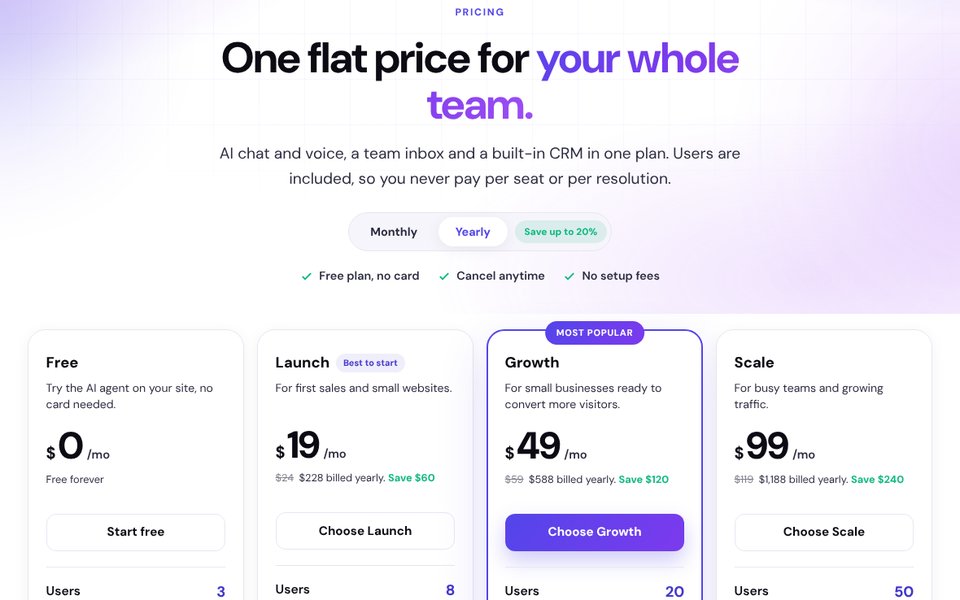
CRMsoftware.pro is our product, so judge this section with that in mind. It starts from the AI agent: it answers on your website chat, WhatsApp, Telegram, Instagram, Messenger and Slack, and hands over to a person with an AI summary.
Every conversation becomes a contact and a deal in the built-in pipeline. AI messages and users are included in the plan, so there is no per-conversation AI fee.
Price (Oct 24, 2026): Free for 3 users and 100 AI messages a month (website widget only, no human handover or unified inbox). Launch $19/mo billed yearly ($24 monthly) for 8 users and 1,000 AI messages.
Growth $49 ($59) for 20 users, 3,000 AI messages and the team inbox with saved replies. Scale $99 ($119) for 50 users and 10,000 AI messages.
Pros: flat price for the whole team; AI included, no second bill; replies in 95+ languages; CRM pipeline, bookings and AI voice built in.
Cons: the email inbox is still in beta; no SMS channel or broadcast campaigns on the pricing page; Meta's WhatsApp fees aren't listed there; the team inbox with saved replies starts on Growth ($49).
Best for: small sales and support teams that want AI chat, messaging and a CRM in one bill.
Add up last month's Trengo invoice, including conversation top-ups and AI charges, then compare with a plan that includes users and AI messages. Start free, no card needed, or see pricing.
2. respond.io: best for WhatsApp-first sales teams
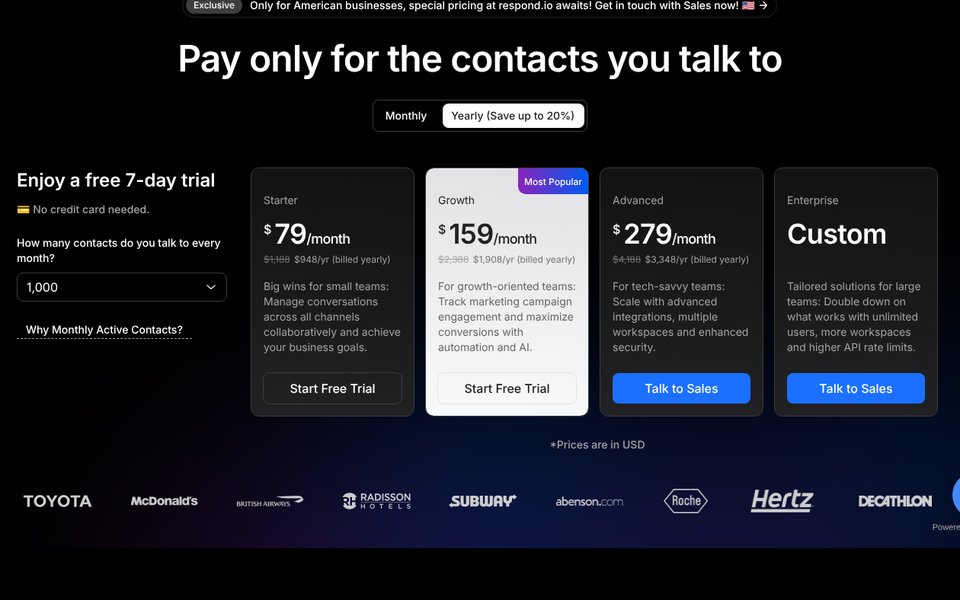
respond.io is a messaging inbox built around WhatsApp and other chat apps, with AI agents, workflows and a contact lifecycle. It charges by monthly active contacts, the people you talk to, not by conversation.
Price (Oct 24, 2026, billed yearly): Starter $79/mo ($99 monthly) for 5 users with unlimited monthly active contacts and 5,000 AI credits. Growth $159 ($199) for 10 users and from 1,000 monthly active contacts. Advanced $279 ($349).
Growth includes 10,000 AI credits a month (more cost $15 per 1,000), with AI agents included under a fair-use policy. Extra users cost $12–$24 a month by plan, and extra contacts $12 per 100 on Growth. WhatsApp fees are paid to Meta through a top-up.
Pros: strong on WhatsApp, including calling; AI credits included on every plan; you pay for contacts, not conversations.
Cons: AI agents and automation start on Growth; email is lighter than in an email-first inbox; costs rise with active contacts.
Best for: sales teams that sell and support mainly over WhatsApp.
3. SleekFlow: best for social commerce and Asian chat apps
SleekFlow is an omnichannel inbox with AI agents, broadcasts and a WhatsApp catalog. Its channel list is wide: WhatsApp, Instagram, Messenger, TikTok, WeChat, Telegram, LINE, Viber and SMS, with Gmail, Outlook and voice calls listed too.
Price (Oct 24, 2026, billed yearly): Essential $49/mo for 3 users and from 500 monthly active contacts, with an AI inbox co-pilot only (the plan card says 500 contacts; the comparison table says unlimited). Pro $109 for 10 users and 500 contacts, with AI agents and broadcasts. Premium $279 for 10 users and 1,000 contacts.
Extra seats cost $15–$25, extra contacts $20 per 100. Each WhatsApp number costs $15 a month plus per-conversation rates.
Pros: the widest chat-app coverage here; broadcasts on Pro; low entry price.
Cons: AI agents start on Pro; Essential is still rolling out by country; WhatsApp number hosting is an extra fee.
Best for: retail and ecommerce teams selling over chat apps, especially in Asia.
4. Front: best for email-heavy support teams
Front is a shared inbox that feels like email, with assignments, comments and rules on top. It suits teams whose main channel is still email, with WhatsApp and SMS next to it.
Price (Oct 24, 2026, billed yearly): Starter $25 per seat a month for up to 10 seats, with one channel type only (email, Front Chat or SMS). Professional $65 per seat for up to 50 seats, omnichannel. Enterprise $105 per seat.
Native WhatsApp is an add-on on Professional and Enterprise, billed at Meta's cost plus a 20% admin fee. Autopilot AI starts at $0.05 per conversation; Copilot is $20 per seat.
Pros: the best email workflow here; cheap AI per conversation; 14-day trial without a card.
Cons: omnichannel starts at $65 per seat; WhatsApp is an add-on with a 20% fee on Meta's costs.
Best for: support and account teams that live in email.
5. Missive: best for small teams living in email
Missive is a team inbox for email, SMS and social accounts, with shared conversations, tasks and calendar syncing. WhatsApp, Messenger and Instagram are listed among its integrations.
Price (Oct 24, 2026, billed yearly): Starter $14 per user a month for up to 5 users. Productive $24 for up to 50 users, with rules, integrations and API access. Business $36 with SSO and advanced analytics.
AI drafts use Missive AI credits or your own Anthropic, OpenAI or Gemini key. There is a 30-day free trial.
Pros: low per-user price; strong email and team collaboration; bring your own AI key.
Cons: the pricing page doesn't mention live chat or AI credit prices; it lists AI drafts and AI rules, not a customer-facing AI agent; built around email first.
Best for: small agencies and service teams that mainly answer email.
6. Crisp: best flat price per workspace
Crisp is a chat-first omnichannel inbox with a knowledge base, chatbot and AI agent. You pay per workspace with seats included, not per conversation, which is the closest model to Trengo's but at a lower price.
Price (Oct 24, 2026, as shown monthly): Free for 2 seats, no AI. Mini $45 a month per workspace for 4 seats, a shared email inbox and $5 of AI credits. Essentials $95 for 10 seats, $25 of credits and WhatsApp, Instagram, SMS, LINE and Viber.
Plus costs $295 for 20 seats with $75 of credits, and extra agents are $10 each. You can switch to yearly billing in the app.
Pros: flat price with no conversation cap; 10 seats for $95; AI conversations cost cents.
Cons: WhatsApp and social channels start on Essentials; one account per chat channel type per workspace (email excepted); more cost extra.
Best for: teams of 4–20 that want predictable pricing.
7. Freshchat: best for a Freshworks stack
Freshchat is the chat and messaging product from Freshworks, part of the Freshworks suite, with Freddy AI.
Price (Oct 24, 2026, billed yearly): Free for up to 10 agents (web chat and email, no WhatsApp). Growth $19 per agent a month with WhatsApp, Instagram, Messenger and SMS. Pro $49, Enterprise $79.
The Freddy AI Agent includes the first 500 sessions, then costs $49 per 100; the page doesn't say whether the 500 are one-time or monthly. More in our Freshchat alternatives guide.
Pros: generous free plan; WhatsApp from $19 per agent; 500 AI sessions included to start.
Cons: AI is billed per session after the included 500; per-agent pricing.
Best for: teams already on Freshworks.
8. Zendesk: best full help desk with ticketing
Zendesk is the classic help desk: tickets, a help center, messaging and reports. Choose it when you need structured ticketing and SLAs more than a fast chat inbox.
Price (Oct 24, 2026, billed yearly): Support Team $19 per agent a month ($25 monthly), without WhatsApp. Suite Team $55 ($69) with WhatsApp and social messaging, where extra fees apply. Suite Professional $115 ($149).
Each agent includes 5 automated AI resolutions a month (10 on Professional); extra ones cost $2 pay as you go or $1.50 committed. Copilot is $50 per agent, on Suite Professional and up.
Pros: ticketing, help center and messaging in one suite; AI resolutions included in every plan; monthly billing available.
Cons: WhatsApp starts at $55 per agent with extra fees; AI resolutions add up fast; more setup than Trengo.
Best for: support teams that need ticketing, SLAs and a help center.
9. Intercom (Fin): best AI-first help desk
Intercom is a help desk built around its own AI agent, Fin. It suits teams that want the AI to answer conversations on its own, not just suggest replies.
Price (Oct 24, 2026, billed yearly): Essential $29 per seat a month at list price, or $19 for new customers. Advanced $85, Expert $132.
Fin costs $0.99 per outcome. Live chat and support email are included; WhatsApp is charged per conversation and SMS per message.
Pros: AI agent on every plan; new-customer discount on Essential; good messenger and in-app tools.
Cons: seats plus outcomes add up; handoffs can count as outcomes; WhatsApp is pay as you go.
Best for: support teams that want the AI to resolve many chats.
Free Trengo alternatives
Trengo has no free plan. These tools do, with limits:
- Freshchat Free: up to 10 agents with web chat and email; no WhatsApp.
- Crisp Free: 2 seats and a chat widget, no AI credits.
- CRMsoftware.pro Free: 3 users and 100 AI messages a month on website chat; human handover and WhatsApp start on Launch ($19).
respond.io (7 days), SleekFlow (7 days), Front (14 days), Zendesk (14 days), Intercom (14 days) and Missive (30 days) offer free trials instead.
When to stay on Trengo
Stay if your team has 8–10 agents or more. Trengo includes 10 users on Boost and 20 on Pro, so with 10 users Boost works out at about €30 per person a month.
It also fits if you need email, WhatsApp, social, chat and voice in one inbox and your volume stays under the conversation cap. Move when your team is small, or when top-ups and AI charges make the bill hard to predict.
How to choose
| If you… | Choose |
|---|---|
| want AI chat, an inbox and a CRM at one team price | CRMsoftware.pro |
| sell mainly over WhatsApp | respond.io |
| sell over TikTok, WeChat, LINE or other chat apps | SleekFlow |
| answer mostly email in a large team | Front |
| are a small team that lives in email | Missive |
| want a flat price with no conversation cap | Crisp |
| already use Freshworks | Freshchat |
| need ticketing, SLAs and a help center | Zendesk |
| want the AI to resolve as many chats as possible | Intercom (Fin) |
How to switch from Trengo
- Check your contract. If you pay yearly, plan the switch around your renewal date.
- Export your data. Save contacts, conversation history and labels from Trengo, and keep the export as a backup.
- Move the WhatsApp number. Your WhatsApp Business API number can be moved to a new provider; ask the new vendor how they handle the migration so you keep the number.
- Move the FAQs and help articles. They train the new AI agent, so import them before you switch the AI on.
- Rebuild rules and quick replies. List the automations you use and rebuild only those.
- Reconnect channels and run both for a week. Point email, Instagram, Messenger and the chat widget to the new tool, and close open conversations in Trengo before you cancel.
FAQ
What is the best Trengo alternative?
For small teams that want AI chat, a shared inbox and a CRM with users and AI messages included, CRMsoftware.pro from $19 a month. For WhatsApp-first sales, respond.io.
For an email-first inbox, Front or Missive. For a flat workspace price, Crisp. For an AI-first help desk, Intercom (Fin).
How much does Trengo cost in 2026?
On October 24, 2026: Boost €299 a month billed yearly (€349 monthly) for 10 users and 6,000 conversations a year; Pro €499 (€599) for 20 users and 18,000 conversations a year; Enterprise on request. At €1 = $1.12, Boost is about $335 and Pro about $559 a month.
Does Trengo charge per user or per conversation?
Both, in a way. Each plan includes a set number of users and conversations. Extra users cost €25 or €40 a month billed yearly, and extra conversations €15 per 100.
How much does Trengo's AI cost?
Each conversation that uses the HelpMate AI agent costs €0.25 on yearly billing or €0.30 monthly. Boost includes 600 suggested-reply conversations a year and Pro 1,200. Conversations the AI answers by itself (Autopilot) are charged per use.
Does Trengo have a free plan?
No. Trengo offers a free trial, limited to 100 AI conversations. Freshchat, Crisp and CRMsoftware.pro have free plans.
Is Trengo priced in dollars?
No, Trengo prices in euros. The USD and GBP switch on its pricing page converts the euro price with a live exchange rate, so the dollar price changes with the rate.
Which Trengo alternative is cheapest for a small team?
In our 3-agent example with 200 AI conversations a month, CRMsoftware.pro Growth costs $49 and Crisp Essentials $95. Freshchat Growth costs $57 while its 500 included AI sessions last, then $155; Missive is $72 plus AI.
Trengo Boost costs €349, about $391.
Can I keep my WhatsApp number if I leave Trengo?
Usually yes. A WhatsApp Business API number can be moved between providers. Ask the new vendor to plan the move before you cancel Trengo, so the number isn't left unconnected.
Sources
- Trengo pricing, checked Oct 24, 2026, with the monthly and yearly toggle, add-ons and WhatsApp section.
- Trengo: AI billing explained and Trengo: new plan pricing, checked Oct 24, 2026.
- Exchange rate €1 = $1.12 from ExchangeRate-API, the feed Trengo's currency switch uses, Oct 24, 2026.
- Trengo reviews: G2 and Capterra, checked Oct 24, 2026.
- Pricing pages checked Oct 24, 2026: CRMsoftware.pro, respond.io, SleekFlow, Front, Missive, Crisp, Freshchat, Zendesk, Intercom.
An omnichannel inbox without paying for 10 seats
AI chat, a team inbox and a CRM pipeline with users and AI messages included. Free for 3 users; Launch is $19/month billed yearly for 8 users and 1,000 AI messages, Growth $49 for 20 users and 3,000.
Start free See pricing

